Compare · VEED alternative

Voxcene vs VEED

VEED is a video editor for teams that works mainly in the browser. Voxcene is an iPhone app for people who film and post from their phone. Both can caption, clean up and export your videos. Below is where each one is stronger, and VEED's facts are taken from VEED's own pages.

Download on the App Store Free to download
for iPhone
  • Native iPhone app
  • Subtitle files on every plan
  • Basic €8.99/month
  • Sources checked October 2026

01 · Side by side

Voxcene as a VEED.io alternative, feature by feature

A green mark means one app is clearly ahead on that row, and the rest come down to fit. We checked veed.io and VEED's store listings on 27 October 2026. When a cell says “Not compared”, we didn't find it on VEED's own pages, which doesn't mean VEED can't do it.

FeatureVEEDVoxcene
Where you edit In a browser; iPhone app (iOS 18+) and Android app Native iPhone app
Free plan 720p with watermark; exports up to 10 min; 10 min of auto subtitles a month A trial: 3 projects a month, 60-second videos, 720p with watermark, 3 caption minutes
Paid, from Creator €22/month, or €11/month billed yearly, per editor Basic €8.99/month or €89.99/year
4K export Pro and up Premium
Caption minutes Unlimited on paid plans (fair use 50 h/month) 120 a month on Basic, 600 on Premium
Subtitle files SRT, VTT, TXT on paid plans SRT, VTT, ASS, TXT, JSON on every plan
Subtitle translation Over 125 languages (VEED's tool page) Any of 60+ languages, Premium credits
Dubbing 29 languages, voice kept, optional lip-sync One voice, no lip-sync, 60+ languages (Premium)
Cut ums and silences Magic Cut: filler words and silences Filler Removal (English and Greek) and AI Auto Trim (Premium)
Eye contact, AI avatars Yes, both Not in Voxcene
Stock audio and video Yes, on paid plans None: your own media, or generated music (Premium)
Team editing Several editors; reviewers and comments on Studio Not in this version
Podcast episodes Not compared Podcast: 2–4 people, cuts to whoever talks (Premium)
Colour grading Not compared Looks, wheels, HSL, curves and scopes on every plan
Teleprompter In the browser; VEED says it can't record on mobile In the app, free
Brand kit Limited on Creator; several brands from Pro 1 on Basic, 5 on Premium
App language English English and Greek

VEED's own pages give different language counts (50+, 125+ and 150+ for translation; 25+ and 29 for dubbing). The table quotes the tool page for each feature.

02 · Pricing

What each one costs

The two price their plans differently. VEED charges per editor, and its pricing page in euros lists Creator at €22 a month (€11 a month billed yearly), Pro at €47 (€23) and Studio at €76 (€37). VEED's iPhone app sells the same plans through the App Store; in the Greek store, Creator was €29 a month or €179.99 a year. Voxcene charges one price for one person.

VEED (veed.io, per editor)

  • Free€0 · 720p · watermark · 10 min of subtitles a month
  • Creator€22/month · €11/month yearly · 1080p · no watermark
  • Pro€47/month · €23/month yearly · 4K · dubbing minutes
  • Studio€76/month · €37/month yearly · reviewers · custom watermarks

Voxcene (App Store)

  • Free€0 · 60-second videos · 720p · watermark · subtitle files
  • Basic€8.99/month · €89.99/year · 15-min videos · 1080p · no watermark
  • Premium€17.99/month · €179.99/year · 90-min videos · 4K · 600 AI credits
  • Trial7 days free on Premium yearly

One honest caveat: Voxcene's Basic plan has no AI credits, so translation, dubbing and the AI Studio tools are Premium. VEED's Creator plan includes AI credits. If you need AI tools on a budget, compare Voxcene Premium at €17.99 with VEED Pro.

03 · Fit

When to choose which

Choose VEED when…

  • You work at a desk. VEED runs in the browser, and its teleprompter and screen recorder are built for a computer.
  • Several people touch each video. Multiple editors, reviewers and time-stamped comments are part of VEED's plans.
  • You need footage you didn't film. Stock audio and video, AI avatars and AI-generated clips are all on VEED.
  • Lip-sync matters. VEED's dubbing can match the mouth to the translated speech. Voxcene's doesn't.

Choose Voxcene when…

  • Your phone is your studio. Film, caption, cut and post without moving files to a computer. There's a free teleprompter in the app.
  • You want to see every AI cut first. Filler Removal and AI Auto Trim list what they found. Nothing changes until you apply it, and a single undo puts it back.
  • Your videos are long. Up to 90 minutes on Premium, with Long Video to Reels and Podcast to cut it into clips.
  • You publish subtitles, not just videos. SRT, VTT, ASS, TXT and JSON on every plan.

04 · AI tools

AI that shows its work

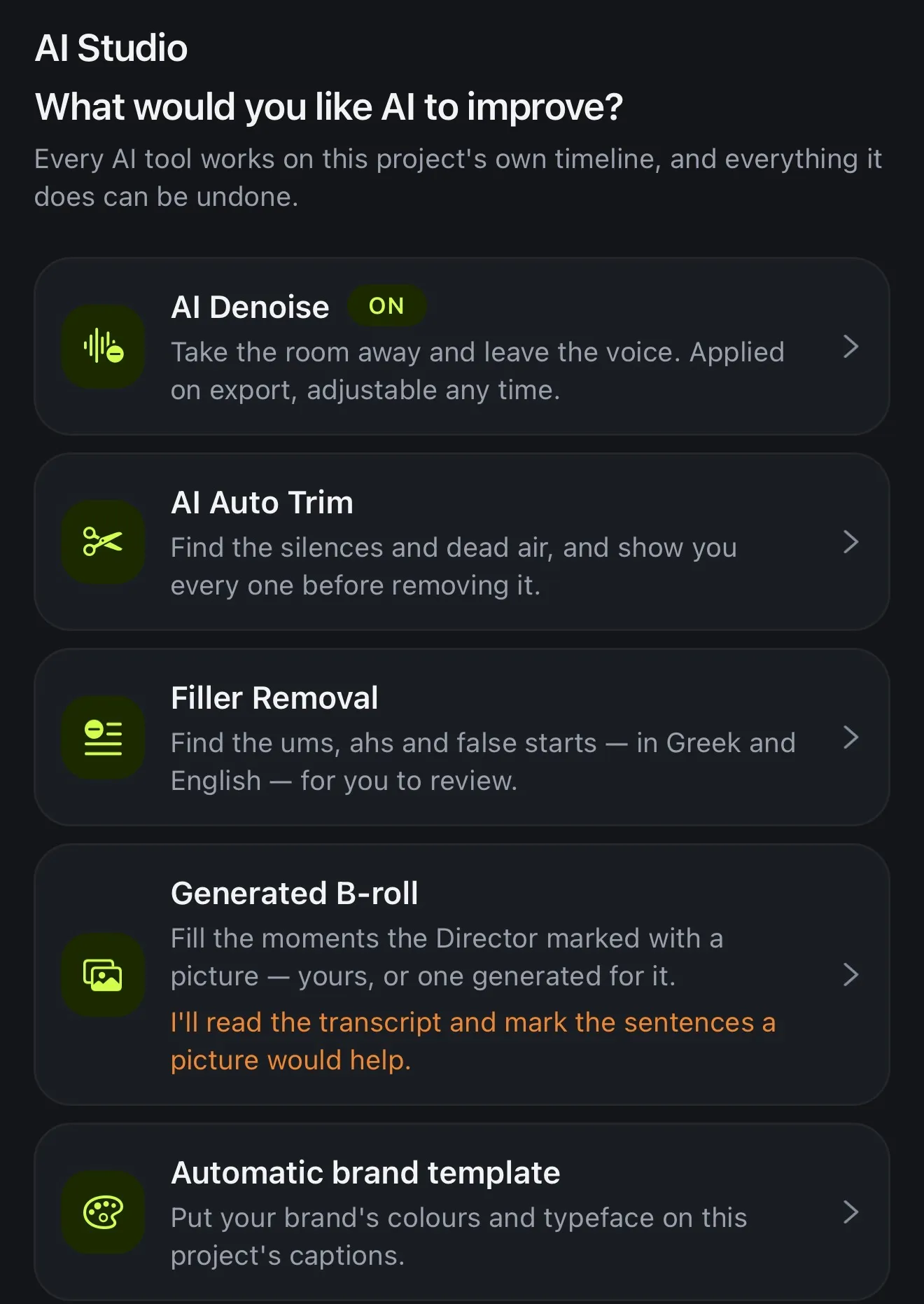
VEED has the wider AI menu, with avatars, eye contact, AI-generated video and voice cloning. Voxcene's is narrower and aimed at one job: finishing a talking video. In AI Studio on Premium, AI Denoise removes room noise and AI Auto Trim finds silences. Filler Removal finds the ums in English and Greek, and Dub into another language voices your captions in a new language.

Each tool works on the project's own timeline, and you can undo any change. For a wider view of AI editors, see the best AI video editors, or our caption apps comparison, which also covers VEED.

Voxcene's AI Studio sheet: AI Denoise switched on, AI Auto Trim, Filler Removal for Greek and English, Generated B-roll and Automatic brand template
AI Studio: each tool shows you what it found

How it works on iPhone

How to caption and clean a video in Voxcene on iPhone

  1. Download Voxcene

    Get Voxcene free from the App Store on your iPhone and sign in. There's no browser or upload page, because the editor is the app itself.

  2. Start a project

    Tap New project and choose the video from your phone. Add more clips to the same timeline if you need them.

  3. Caption it

    Pick the spoken language or Detect automatically. Fix any word in Captions, where the words are listed in order.

  4. Tidy it up

    Choose a caption look in Style. On Premium, open AI Studio for Filler Removal, AI Auto Trim or AI Denoise. Each one shows you what it found before anything is cut.

  5. Export

    Tap Export for the video, and tick SRT, VTT, ASS, TXT or JSON for subtitle files. You can do that on every plan.

FAQ

Questions people ask

What is the best VEED.io alternative for iPhone?

If you edit on your phone and mostly need captions and quick clean-up, Voxcene is a native iPhone editor built for that. If you work in a browser on a computer, with a team that reviews and comments, VEED's web app does things Voxcene doesn't, such as shared workspaces, AI avatars and eye-contact correction.

Is there a free VEED alternative?

Voxcene is free to download, with a free plan for trying it: 3 projects a month, videos up to 60 seconds, 3 minutes of captions and 720p exports with a watermark. Subtitle files can be exported on every plan, including Free. VEED's free plan, per its pricing page, also exports 720p with a watermark and doesn't include subtitle downloads.

Is Voxcene cheaper than VEED?

Voxcene Basic is €8.99 a month and Premium €17.99. VEED's pricing page (in euros, October 2026) lists Creator at €22 a month, or €11 a month billed yearly, per editor; its iPhone app's Creator plan was €29 a month in the Greek App Store. Prices vary by country.

Does VEED have an iPhone app?

Yes. VEED's App Store listing, VEED - AI Video Creation, needs iOS 18 or later, and VEED says the subscription covers the web version too. VEED also has an Android app on Google Play. Voxcene has an iPhone app and a web studio at studio.voxcene.com, and no Android app.

Which one does lip-synced dubbing?

VEED. Its video translator page offers lip-sync and keeps the speaker's voice across 29 languages. Voxcene's Dub into another language reads your translated captions aloud in one voice, in any of 60+ languages, without lip-sync.

Can I export SRT subtitles?

In Voxcene, yes, on every plan: SRT, VTT, ASS, TXT and JSON. VEED lets paid users download SRT, VTT and TXT files; its pricing table doesn't include subtitle downloads on the free plan.

Can my team edit together in Voxcene?

Not in this version. Voxcene is for one person editing on an iPhone. VEED's plans include several editors, and its Studio plan adds reviewers with time-stamped comments.

Start your next video on the phone you film with.

Download on the App Store Download on the App Store – free