AI video analyzer
Analyse your video with AI
Find out what's in your video before you edit it. Analyse this video counts the long pauses and filler words and checks the sound and the framing. It also lists the subjects from your transcript, and tapping one takes you to where it starts.
for iPhone
- Counted, not guessed
- Subjects with timestamps
- Nothing is changed
- 1 AI credit
01 · The report Premium
What “Analyse this video” reports
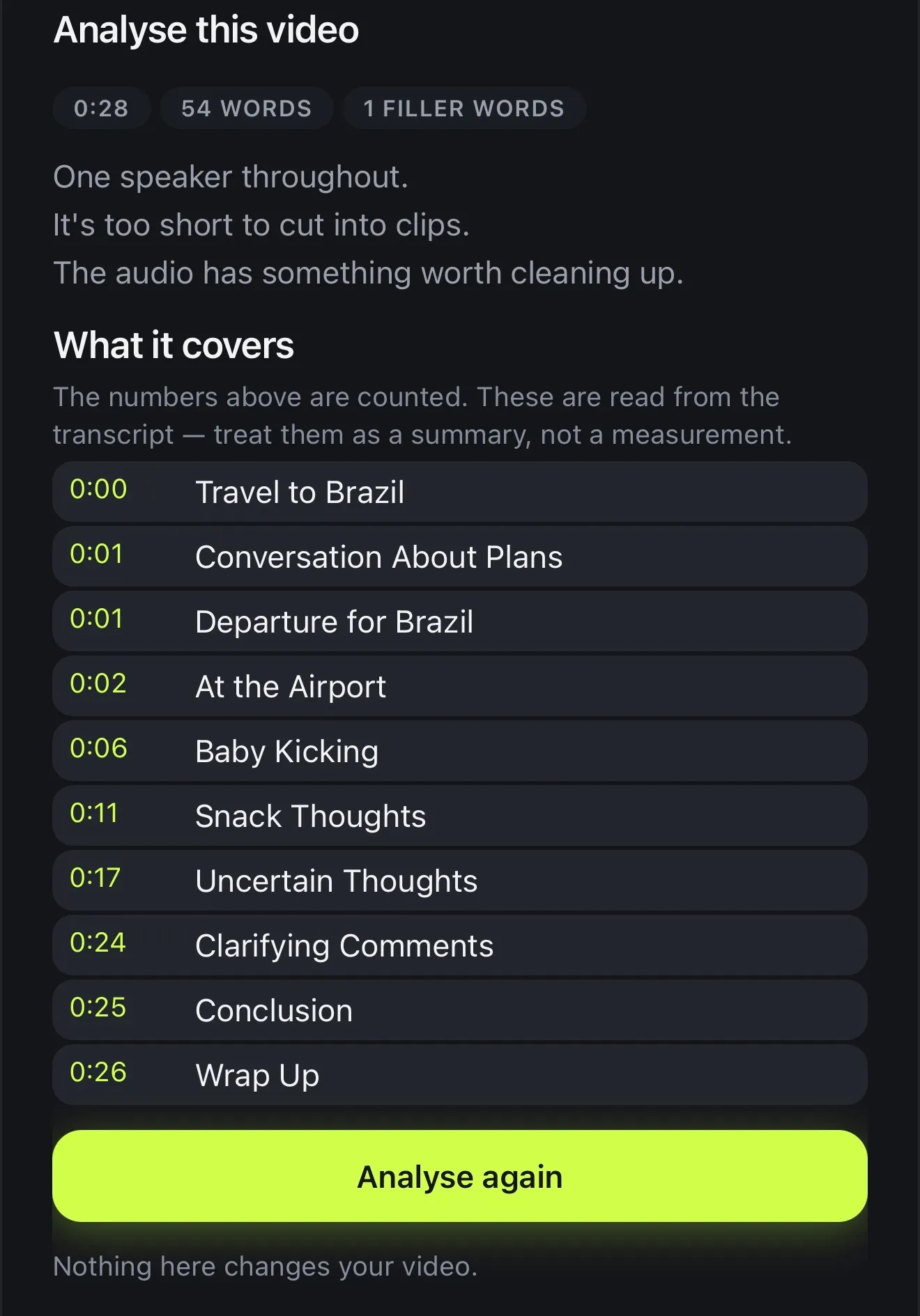
Analyse this video sits at the top of AI Studio because it's the obvious place to start: what's actually in this project? You get the numbers first. That's how long it runs, how many words are spoken, and how many long pauses and filler words it has.
Under the numbers there are a few short lines saying what they add up to, and you only get the ones that apply to this video. They tell you if one person speaks or several, if the audio needs cleaning up and if it's vertical yet. One more says whether there's enough unbroken speech to cut short clips from, or the video is too short for that.
It doesn't recommend anything. It's a description, kept separate from the tools that act on it, so you can look at the numbers first and then decide what to do.
- Length and word count
- Long pauses and filler words
- One speaker or several
- Sound, framing, and whether there's enough for Reels
Lines the analysis can write
- One speaker throughout.
- More than one speaker.
- There's enough continuous speech here for short clips.
- It's too short to cut into clips.
- There are noticeable pauses that could be tightened.
- There are filler words worth reviewing.
- The audio has something worth cleaning up.
- The audio measured clean.
- The framing isn't vertical yet.
- It's one continuous shot, so it may lose attention.
- No speech was detected in this project.
The app's own wording. Each video gets only the lines that are true of it.
02 · Measured
Pauses, fillers and sound: counted, not guessed
Most pacing problems come down to dead air, and dead air can be measured. Voxcene checks the timing of each word in your transcript. Any gap of 1.2 seconds or more counts as a long pause, and the “um”s and “uh”s marked in your transcript are counted as filler words.
The sound gets measured as well. Voxcene checks how far your voice stands above the room, whether the recording clipped, and whether the speech is uneven or too quiet. If something's off, you'll see that the audio has something worth cleaning up. If not, it says the audio measured clean.
There's one check on the picture. A single shot that runs past two minutes with no cutaways gets flagged as one continuous shot that may lose attention. It won't grade your hook or your delivery, because a count can't measure those, and it doesn't pretend it can.
- A long pause is a gap of 1.2 s or more
- Filler words counted from your transcript
- Noise, distortion, uneven or quiet speech
- One unbroken shot over two minutes is flagged
How each count is made, in plain words.
03 · Subjects
What it covers: the subjects, with timestamps
A count can't tell you what the video is about. For that, Voxcene goes through your transcript and lists the subjects under What it covers, each with the time it starts. Tap a subject and the playhead jumps there, which saves scrubbing when you're hunting for one section of a long recording.
The app keeps the two apart. The numbers above are counted, while the subjects are read from the transcript, so it asks you to treat them as a summary rather than a measurement. When no clear subjects stand out, it says so instead of making some up.
- Subjects read from the transcript
- Each with the time it starts
- Tap one to jump the playhead there
- Marked as a summary, not a measurement
What it covers
An illustration. Subjects and times invented for this page.
04 · Act on it
Turn insights into edits
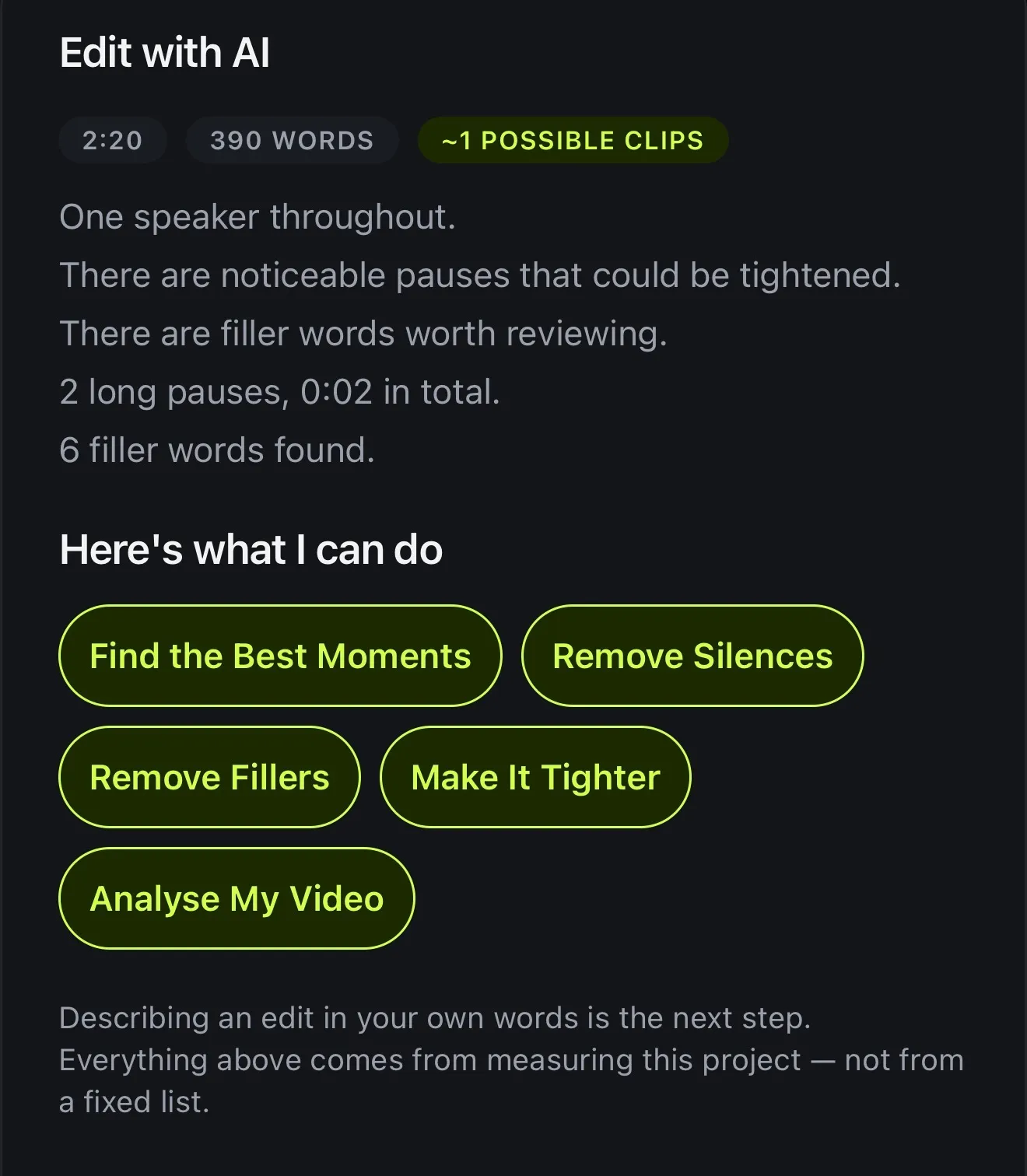
Once you know what's there, the fixes are close by. Open AI Video Editor and its Edit with AI sheet measures the same things, then offers only what this video can use. You'll see Remove Silences when there are several long pauses, Remove Fillers when there are filler words to review, Make It Tighter for both, and Find the Best Moments or Create Reels when there's enough to cut from.
You can also go to the tools directly. AI Auto Trim shortens the pauses and Filler Removal lists each “um” before cutting. For steady background noise there's AI Denoise. Any change can be undone in one step, and afterwards you can tap Analyse again to see the new numbers.
- Edit with AI offers only what fits this video
- Remove Silences, Remove Fillers, Make It Tighter
- Find the Best Moments, Create Reels
- Nothing changes until you apply it
How it works on iPhone
How to analyse a video on iPhone
-
Caption the video
Open your project. The subjects are read from what's said, so transcribe it first.
-
Open the analysis
Tap AI Studio, then Analyse this video. The measuring starts as soon as it opens.
-
Read the numbers
See the length, the word count, the long pauses and the filler words, with a plain line about the speakers, the sound and the framing.
-
Jump to a subject
Under What it covers, tap any subject to move the playhead to where it starts.
-
Act on it
Use the AI Studio tools to fix what you found, then tap Analyse again to see the new numbers.
FAQ
Questions people ask
What does an AI video analyzer do?
It looks at a video and tells you what's in it. Voxcene's Analyse this video counts the length, the words, the long pauses and the filler words, and checks the sound and the framing. It also pulls the subjects it covers from your transcript, each with the time it starts.
Does analysing a video change it?
No. The sheet itself says nothing here changes your video. It only describes the project. The tools that do change it are separate, and each one shows what it will do before you apply it.
Does it rate my hook or predict views?
Not in this version. Everything it reports is counted from your words, their timing and the sound, except the subjects, which are read from the transcript and marked as a summary rather than a measurement. It gives no hook rating and no view prediction.
What counts as a long pause?
A gap of 1.2 seconds or more between two words, which is long enough for a viewer to notice. The count shows how many there are, and AI Auto Trim can shorten them.
Does it work on a video with no talking?
The length, the sound and the framing are still checked, and it says that no speech was detected. The subjects are read from the transcript, so a video with no speech has none to list.
What does it cost?
Analyse this video is part of AI Studio in Premium. Reading the subjects uses 1 AI credit; the counting (words, pauses, filler words, sound and framing) costs nothing.