Video editor for iPhone

The video editing app that does the editing

Voxcene is a video editing app that puts clips, captions, music, voiceover, colour and motion on one timeline. Its AI Studio can propose the cut, so you spend more time deciding and less time dragging.

Download on the App Store Free to download
for iPhone
  • Multi-clip timeline
  • Captions in 60+ languages
  • Export up to 4K
  • Free to start

01 · Timeline

Everything in one timeline: clips, music, voiceover, motion

The whole video sits on one timeline. That means the footage, the captions card by card, text and pictures, Motion graphics, and music and voiceovers on lanes of their own. Hold a clip to drag it into place, or split it where the playhead is. You can set the speed and volume of anything you drop in.

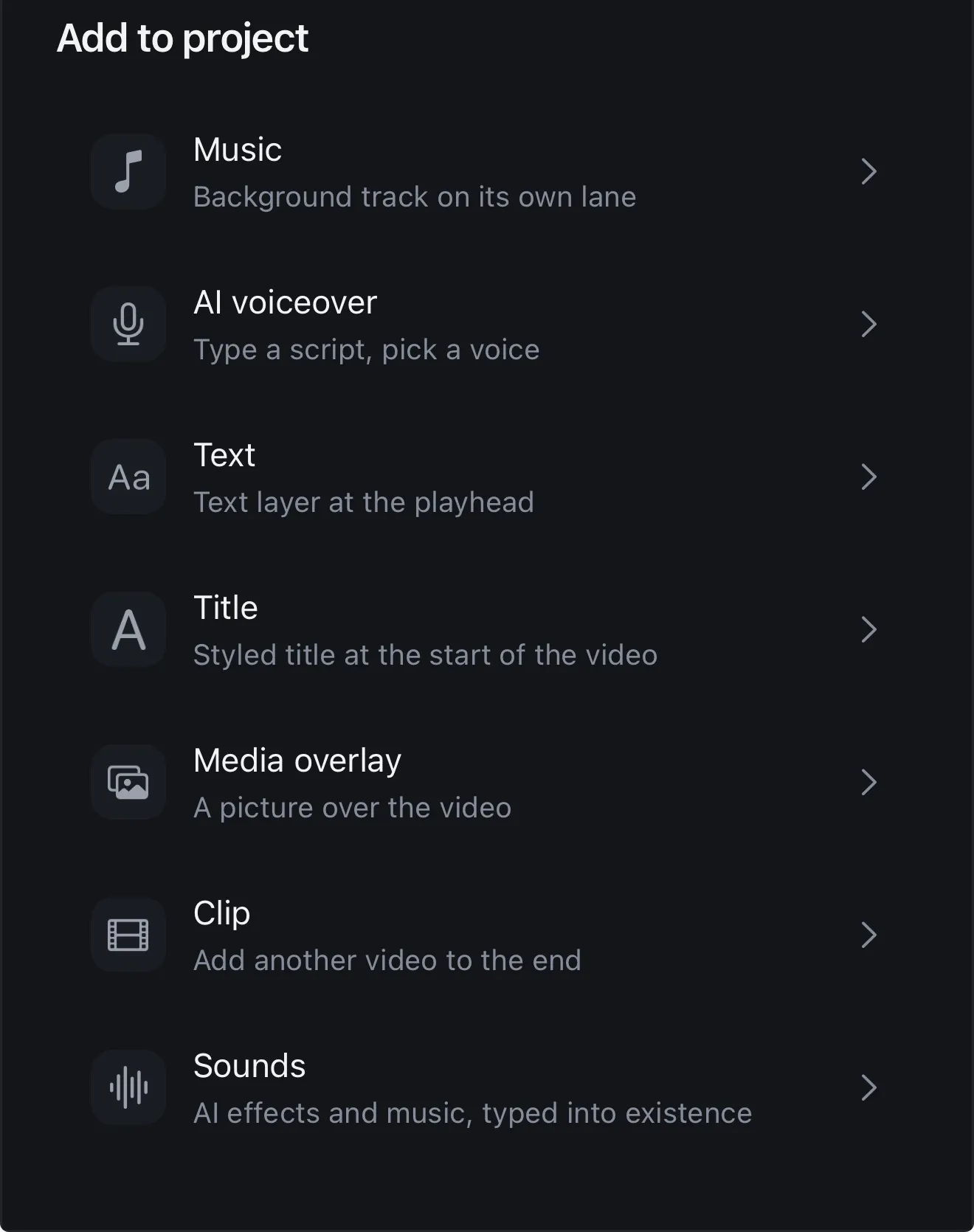
Tap + to add something to the project: music, an AI voiceover, a text layer, a title, a picture over the video, another clip, or sound effects made from a line you type. Read more about trimming and splitting and adding text.

  • Several clips in one project, reordered by drag
  • Lanes for captions, text, music, voiceover and Motion
  • Split, speed, volume, scale and duration per clip
  • 25 transitions between clips
The Add to project sheet: Music, AI voiceover, Text, Title, Media overlay, Clip and Sounds
Tap + to add anything to the timeline

02 · AI Studio Premium

AI Studio makes the first cut

Start by picking what the video is for: a tight Hook, a clear Tutorial, or a Story that keeps its rhythm. AI Edit then works from your transcript and proposes a full edit, with the cuts, a caption style, a look and title cards. Auto Trim finds the dead air and Filler Removal finds the “um”s. For long recordings, Long Video to Reels picks out the moments that stand on their own.

Each tool shows you its suggestions first. You keep the ones you like, and the timeline only changes when you say so. See everything in AI Studio.

  • Pick a goal: Hook, Tutorial or Story
  • Silences and filler words, listed before they go
  • The Reels inside a long video
  • Nothing changes until you press apply

03 · Built in

Captions, colour and audio built in

You don't need a second app for subtitles or a computer for the sound. The jobs most editors send somewhere else are tabs in Voxcene.

  • Captions

    Automatic captions in 60+ languages and 143 styles. You can then change the font, size and three colours of each one.

  • Colour

    Looks that preview on your own scene, then wheels, HSL, curves and scopes in a colour room of their own.

  • Audio

    Music on its own lane, a voiceover and sound effects, plus AI Denoise to push the room noise back and keep the voice.

Go deeper: colour grading · resize and crop · caption styles

Plans

Voxcene Gold Tickets

Three plans on one ticket. The gold column opens AI Studio, Make with AI and Podcast.

Billing period
VX · ADMIT ONE
What each plan includes, and what it costs
Free Basic Premium AI STUDIO
Price €0 forever €8.99 a month €89.99 a year save 17% €17.99 a month €179.99 a year save 17% 7-day free trial
Video length 60 sec 15 min 90 min
Transcription a month 3 min 120 min 600 min
Caption styles 4 of 143 All 143 All 143
Export 720p · watermark 1080p 4K
Filler removal Not included Not included Captions + video
AI credits 20 once Not included 600 a month
AI Studio Not included Not included All 12 tools
Make with AI NEW Not included Not included Included
Podcast NEW Not included Not included Included

Premium can top up: 200 credits for €5.99, 600 credits for €9.99 or 2000 credits for €29.99.

Prices in euros. The App Store charges in your own currency, so your price may differ a little. Cancel from your Apple Account whenever you like, and keep what you paid for until the period ends.

Download on the App Store

Start free. No card needed for the free plan.

Your plan works in the app and on studio.voxcene.com.

How it works on iPhone

From camera roll to posted, on your iPhone

  1. Download Voxcene

    Get it free from the App Store and sign in with Apple or Google.

  2. Start a project

    Pick a video from your Photos. Voxcene checks its shape and suggests a frame that fits.

  3. Build the edit

    Split and trim on the timeline, then tap + to add music, a voiceover, text, a title, a picture or another clip.

  4. Caption, grade and clean

    Turn on captions and pick a style. Then grade in the colour room and clean up the sound under Audio.

  5. Export

    Choose a preset (Vertical, Square, Portrait or Widescreen), then save it to Photos or share it.

FAQ

Questions people ask

What is the best video editing app for iPhone?

Ideally, one that lets you finish the whole job on the phone. Voxcene puts a multi-clip timeline, automatic captions in 60+ languages, a colour room with scopes, audio cleanup and an AI Studio in one app. A video can go from your camera roll to Reels, TikTok or YouTube without a computer.

Is Voxcene free?

It is free to download, and the Free plan makes 3 projects a month from videos up to 60 seconds, exported at 720p with a watermark. Basic takes videos up to 15 minutes and exports at 1080p; Premium takes up to 90 minutes, exports in 4K and opens AI Studio. You can compare the plans side by side above.

Can I edit long videos on iPhone?

Yes, up to 15 minutes on Basic and 90 minutes on Premium. On Premium, Long Video to Reels can also pick out the moments that work on their own and turn each one into its own project.

Does it add captions automatically?

Yes. Voxcene transcribes the speech and captions it in 60+ languages, with 143 caption styles to choose from. Greek is handled properly too, including accents, the final sigma and line breaks.

Does Voxcene work on Android or a computer?

Not today. Voxcene is an iPhone app, built for the phone you shoot on.

What does AI Studio do?

It's a set of twelve AI tools in Premium that look at your footage and suggest edits. They can remove silences and filler words, find the Reels in a long video, propose a full edit from your transcript or dub into another language. None of it touches your video until you press apply.

Download it free and edit your next video on the phone.

Download on the App Store Free to download · upgrade only if you need more