Compare · CapCut alternative

Voxcene vs CapCut: the CapCut alternative for iPhone

CapCut is the go-to app for trends and templates. If you mostly make talking videos with captions (tips, interviews, lessons, podcasts), Voxcene was built for that kind of work, and it runs on your iPhone. Below is an honest side-by-side. Every CapCut fact comes from CapCut's own pages.

Download on the App Store Free to download
for iPhone
  • iPhone app
  • Captions in 60+ languages
  • Basic €8.99/month
  • Sources checked October 2026

01 · Side by side

Voxcene vs CapCut, feature by feature

A green mark means one app is clearly ahead on that row. Most rows come down to fit rather than a winner. We took CapCut's facts from capcut.com and the App Store, checked in October 2026. “Not compared” means we couldn't find it stated on CapCut's own pages, which isn't the same as CapCut not doing it.

FeatureCapCutVoxcene
Runs on iPhone, Android, Windows, Mac and the web iPhone and the web
Free plan Yes; using Pro features on mobile adds a watermark A trial: 3 projects a month, 60-second videos, 720p with watermark
Paid, from Pro €19.99/month on capcut.com; App Store prices differ by country Basic €8.99/month; Premium €17.99/month
Templates and effects A very large, trend-driven library 143 caption styles and a set of video templates
Stock music Yes, with licence limits for business use None: your own music, or generate a track (Premium)
Auto captions Yes Yes, 60+ spoken languages, word-level timing
Subtitle files Not compared SRT, VTT, ASS, TXT, JSON on every plan
Cut ums and pauses Filler words on desktop Filler Removal (English and Greek) and AI Auto Trim, Premium
Long video to Reels Not compared Long Video to Reels (Premium); Find the Best Moments, free
Dubbing AI video translator with lip-sync (desktop steps) One voice, no lip-sync, 60+ languages (Premium)
Podcast episodes Speaker detection on desktop, some regions Podcast: 2–4 people, cuts to whoever talks (Premium)
Brand kit On the Teams plan 1 brand kit on Basic, 5 on Premium
App in Greek No Yes (English and Greek)
Longest video Varies by region on the free plan 60 s Free, 15 min Basic, 90 min Premium

Prices vary by country, store and currency. CapCut's pricing page itself says its prices are “for reference only”.

02 · Free plans

Free plan vs CapCut free

To be fair to CapCut: if you need a free editor for everyday edits, its free plan does more than ours. CapCut's help pages say you can export without a watermark as long as you stick to free features. Use Pro features on mobile and the export carries a CapCut watermark.

Voxcene's free plan is a way to try the app on real footage before you pay: 3 projects a month, videos up to 60 seconds, 3 minutes of captions, 4 of the 143 caption styles, and 720p exports with a watermark. The colour room, the teleprompter and subtitle files are free on every plan.

The paid plans are where Voxcene earns its price. Basic, at €8.99 a month, removes the watermark and exports in 1080p. It also takes videos up to 15 minutes and opens all 143 styles. Premium at €17.99 adds 4K, videos up to 90 minutes, 600 AI credits a month and AI Studio, and the yearly plan comes with a 7-day free trial.

Free

€0

  • 3 projects a month
  • Videos up to 60 s
  • 720p, with watermark
  • 4 caption styles

Basic

€8.99/month

  • Videos up to 15 min
  • 1080p, no watermark
  • All 143 styles
  • 1 brand kit · no AI credits

Premium

€17.99/month

  • Videos up to 90 min
  • 4K export
  • 600 AI credits a month
  • AI Studio · 5 brand kits

03 · Fit

Who should switch, and who shouldn't

Stay with CapCut if…

  • Templates are your workflow. CapCut's library of templates and effects is huge, and it keeps up with trends week by week. Voxcene offers caption styles and a smaller set of video templates.
  • You edit on Android, or want a desktop app. CapCut comes in desktop, web and Android versions. Voxcene runs on iPhone and on the web.
  • You need stock music or lip-synced dubbing. CapCut has a music library and a lip-sync video translator, and Voxcene has neither.

Switch to Voxcene if…

  • Your videos are people talking. You get captions in 60+ languages with word-level timing, and you can edit any word. There are 143 styles, and subtitle files come with every plan. More on auto captions.
  • You want the boring cuts done for you, but shown first. Filler Removal and AI Auto Trim show you each cut before anything changes.
  • You turn long videos into clips. Long Video to Reels and Podcast both work on your phone.
  • You post for a business. Basic and Premium include brand kits, and there's no stock library with a licence to read first.

04 · For businesses

The licensing question

If you post for a brand, read CapCut's music and template rules first. Its Materials License Agreement (last updated 22 January 2026) says the regular Sounds library is for personal, non-commercial use, and that promoting a business counts as commercial. A separate Commercial Sounds library is licensed only for use within CapCut, TikTok and TikTok for Business, and only templates labelled for commercial use may be used commercially.

Voxcene avoids the question because it has no stock library. You bring your own music, or on Premium you generate a track or a short brand song in the app. Voxcene's Terms say you own what you upload and make. The full write-up is in our blog post Voxcene vs CapCut for small-business videos.

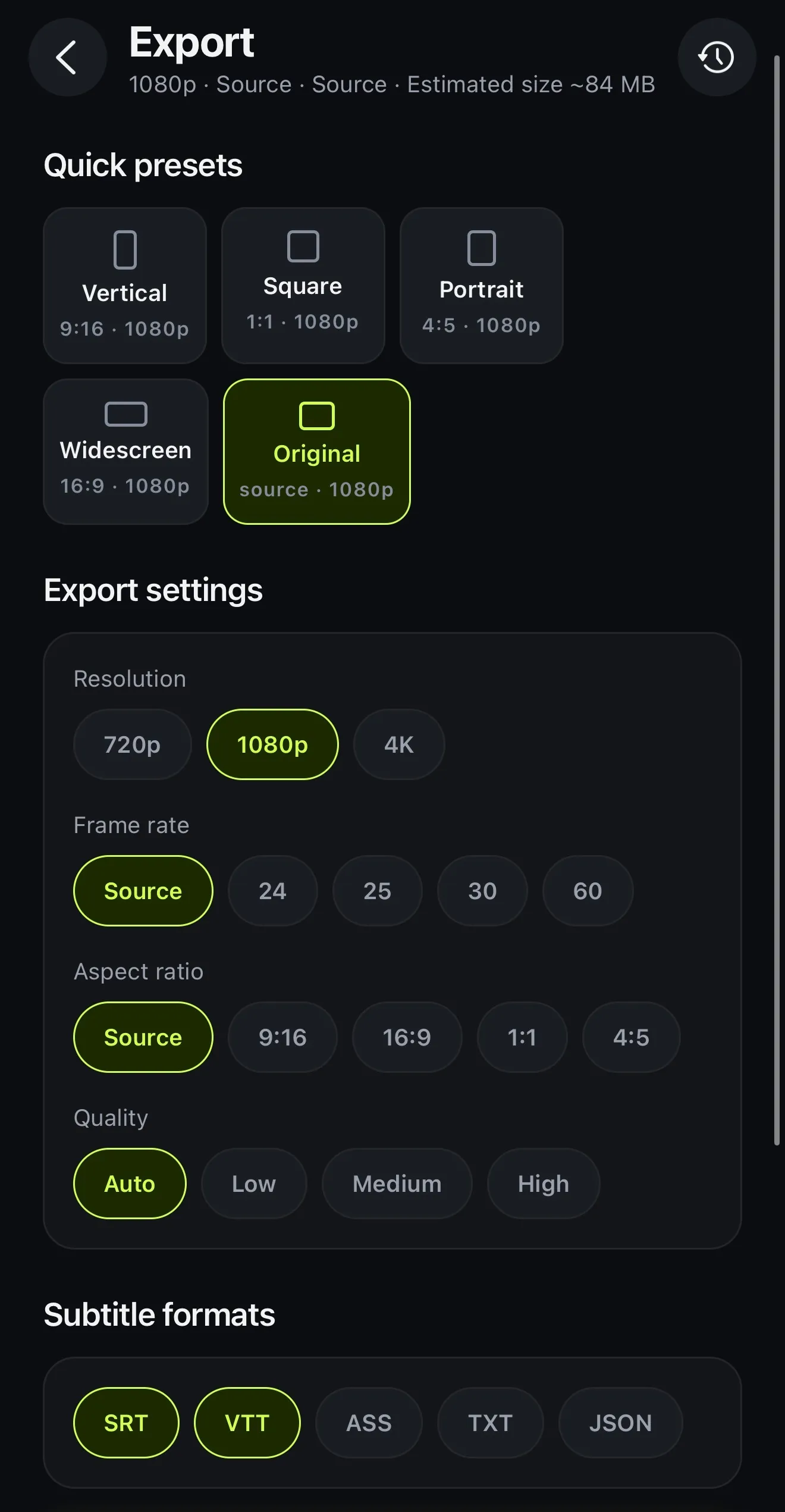
Voxcene's Export screen: quick presets, resolution 720p, 1080p or 4K, frame rate, aspect ratio, quality, and subtitle formats SRT, VTT, ASS, TXT and JSON
Export: the video, plus subtitle files on every plan

How it works on iPhone

How to switch from CapCut to Voxcene on iPhone

  1. Download Voxcene

    Get Voxcene free from the App Store on your iPhone and sign in. The free plan lets you try three short projects a month.

  2. Start a project

    Tap New project and choose a video from your phone. Several clips can go on one timeline.

  3. Caption it

    Pick the spoken language, or Detect automatically. The captions come back timed word by word, and you can fix any of them in Captions.

  4. Make it yours

    Choose a look in Style and cut or trim in Edit. Music goes in under Audio. On Premium, AI Studio can cut the ums and the silences for you.

  5. Export

    Tap Export, pick the resolution your plan allows, and tick the subtitle files you want: SRT, VTT, ASS, TXT or JSON.

FAQ

Questions people ask

What is the best CapCut alternative for iPhone?

It depends on what you use CapCut for. If you mostly caption talking videos, cut ums and silences, or turn long videos into Reels, Voxcene does that on iPhone. If you live on trending templates, CapCut's library is far bigger, and if you edit on a computer a lot, its desktop app is a real advantage.

Is there a free CapCut alternative?

Voxcene is free to download, and its free plan lets you try it: 3 projects a month, videos up to 60 seconds and 720p exports with a watermark. That is a trial, not a full free editor. CapCut's free plan does more; Edits, Instagram's editor, is free with 4K exports and no watermark.

Is Voxcene cheaper than CapCut?

Voxcene Basic is €8.99 a month and Premium €17.99. CapCut's own pricing page lists Pro at €19.99 a month or €179.99 a year, and in the Greek App Store its subscriptions started at €11.99 a month when we checked. Prices vary by country and store, so compare in yours.

Can a business use CapCut's music?

Check before you publish. CapCut's Materials License Agreement (last updated 22 January 2026) makes its regular Sounds library personal and non-commercial, and its Commercial Sounds library is licensed for use within CapCut, TikTok and TikTok for Business. Voxcene has no stock music library: you use your own music, or generate a track on Premium.

Does Voxcene work on Android, Windows or the web?

On the web, yes: sign in at studio.voxcene.com in a browser on Windows or a Mac, with the same account you use in the app. There's no Android app. CapCut runs on iPhone, Android, Windows and Mac, and in the browser.

Can I move a CapCut project into Voxcene?

Not as a project. Export your video from CapCut and bring it into Voxcene as a clip. Voxcene can also export subtitle files (SRT, VTT, ASS, TXT, JSON) on every plan, to use in any other editor.

Does Voxcene do lip-synced dubbing like CapCut's video translator?

No. Voxcene's Dub into another language reads your translated captions aloud in one voice, lined up with your edit. It works in any of 60+ languages, but it doesn't move the lips. CapCut's AI video translator page says it lip-syncs.

Try it on your next talking video.

Download on the App Store Download on the App Store – free