Compare · Captions app alternative

Voxcene vs Captions

Captions (by Mirage) is a mature AI video app, with avatars and lip-synced dubbing. Voxcene is a newer iPhone editor that focuses on captions for longer videos. You approve its AI cuts before they happen, and you can take the subtitle files anywhere. This is how the two compare, using Captions' facts from its own pages.

Download on the App Store Free to download
for iPhone
  • Videos up to 90 min
  • 143 caption styles
  • Subtitle files on every plan
  • Sources checked October 2026

01 · Side by side

Voxcene vs Captions, feature by feature

A green mark means one app is clearly ahead on that row. We took the Captions facts from its help centre, pricing page and App Store listing, checked in October 2026. If a cell says “Not compared”, we didn't find it stated there. That doesn't mean Captions can't do it.

FeatureCaptionsVoxcene
Runs on iPhone, Mac, web; Android as Captions Lite iPhone and the web
Paid, from (Greek App Store) Basic €9.99/month or €69.99/year; Max €29.99/month Basic €8.99/month or €89.99/year; Premium €17.99/month
Free plan Limited credits and one caption template 60-second videos, 4 caption styles, 720p with watermark
Longest video on iPhone Manual editor 10 min; AI Edit 2 min 15 min on Basic; 90 min on Premium
Caption languages 100+ (pricing page) 60+, with word-level timing
Subtitle files Not compared SRT, VTT, ASS, TXT, JSON on every plan
Cut ums and pauses AI Trim (iPhone) Filler Removal (English and Greek) and AI Auto Trim, each listed before cutting (Premium)
AI dubbing AI Lipdub, 31 languages, lip-synced 60+ languages, one voice, no lip-sync (Premium)
AI avatars, eye contact AI Twin and Eye Contact Not in Voxcene
Podcast Clips from multi-speaker videos A full edited episode plus vertical clips, 2–4 people, up to 20 min (Premium)
Colour grading Not compared Looks, wheels, HSL, curves and scopes on every plan
Brand kit Brand colour in AI Edit Brand kits with colours and fonts: 1 on Basic, 5 on Premium
Greek typography Greek captions; typography rules not listed Accents, final sigma and Greek line breaks

Captions' own pages differ on some numbers (100+ caption languages on its pricing page, 91+ in the App Store). They also differ on whether free exports carry a watermark, so we don't state that either way.

02 · Pricing

Pricing, plan by plan

On price the two are close at the bottom and apart at the top. Captions' website lists its plans in US dollars for iPhone: Basic at $9.99 a month with 200 credits, Max at $24.99 with 500 credits, and Frontier from $69.99. In the Greek App Store, Basic was €9.99 a month or €69.99 a year, and Max €29.99 a month.

Captions

  • FreeLimited credits · one caption template
  • Basic€9.99/month or €69.99/year (Greek App Store)
  • Max€29.99/month (Greek App Store) · AI Edit, Lipdub, AI Twin
  • FrontierFrom $69.99/month (captions.ai)

Voxcene

  • Free€0 · 3 projects a month · 60-second videos · 720p with watermark
  • Basic€8.99/month or €89.99/year · 15-min videos · 1080p
  • Premium€17.99/month or €179.99/year · 90-min videos · 4K · 600 AI credits
  • Trial7 days free on Premium yearly

Voxcene Basic is a euro cheaper by the month, and Captions Basic is cheaper by the year. For AI tools, Voxcene Premium at €17.99 a month costs less than Captions Max. Max does include lip-synced dubbing and AI avatars, though, and Premium doesn't. Voxcene Basic has no AI credits.

03 · Fit

Which to choose

Choose Captions if…

  • You want the AI to be on camera. AI Twin turns a selfie into a talking video, and Eye Contact redirects your gaze. Voxcene does neither.
  • Lip-sync matters. AI Lipdub matches the mouth to the new language, in 31 languages.
  • You use more than an iPhone. Captions also runs on a Mac and the web, and on Android as Captions Lite.
  • You want a track record. Captions has tens of thousands of App Store ratings; Voxcene launched in 2026.

Choose Voxcene if…

  • Your videos are long. Interviews, lessons and episodes fit in one project: up to 90 minutes on Premium. Long Video to Reels then cuts the clips.
  • You want to approve every cut. Filler Removal marks each “um” Safe, Review or Keep, and nothing changes until you apply it.
  • You need the subtitles themselves. SRT, VTT, ASS, TXT and JSON on every plan, plus caption translation on Premium.
  • You run a podcast or a brand. Podcast builds the whole episode plus clips. Brand kits put your fonts and colours on every caption.

04 · Captions you keep

Captions that leave the app with you

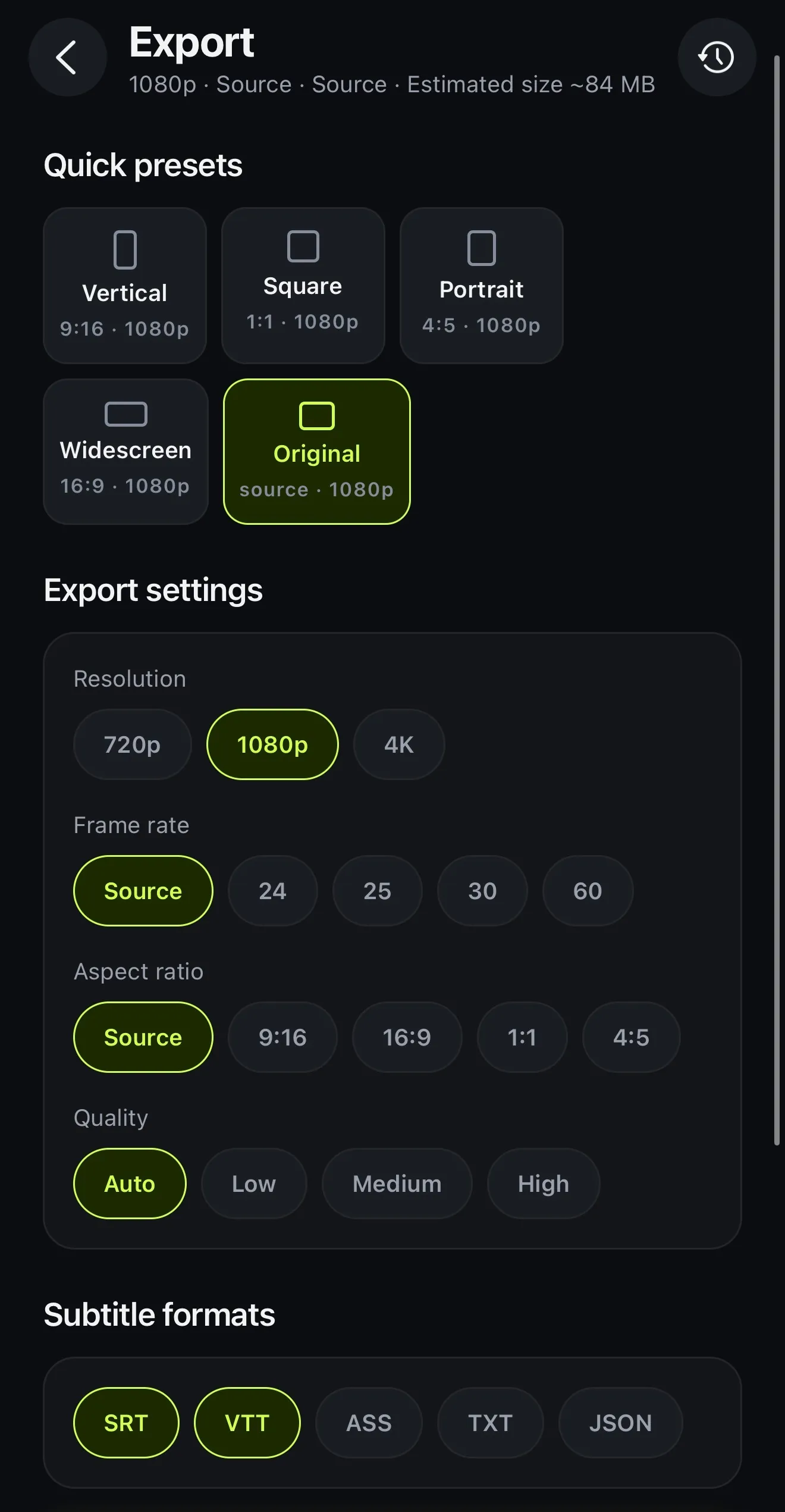
Captions burned into the picture are only half the job. On Voxcene's Export screen you get the video in 720p, 1080p or 4K (depending on plan), and on every plan you can add the subtitle files too. SRT and VTT suit YouTube and video players, and ASS is for styled subtitles. TXT gives you a plain transcript, and JSON includes the word timings.

The captions have word-level timing in 60+ languages, and you can fix any word. You can also split a caption before a word, or merge two. The long version of this comparison is on our blog: Voxcene vs Captions: which caption app should you use?

Voxcene's Export screen: quick presets, resolution 720p, 1080p or 4K, frame rate, aspect ratio, quality, and subtitle formats SRT, VTT, ASS, TXT and JSON
Export: the video, plus subtitle files on every plan

How it works on iPhone

How to caption a video in Voxcene on iPhone

  1. Download Voxcene

    Get Voxcene free from the App Store and sign in. Try it on a short video before you pay anything.

  2. Start a project

    Tap New project and choose your video. It can run up to 15 minutes on Basic, or 90 on Premium.

  3. Caption it

    Pick the spoken language or Detect automatically. In Captions the words are listed in order, and you tap one to fix it.

  4. Style it

    Open Style and choose from 143 caption styles, or tap Save as my style to keep your own look.

  5. Export

    Tap Export for the video in up to 4K on Premium, and add SRT, VTT, ASS, TXT or JSON subtitle files on any plan.

FAQ

Questions people ask

What is a good Captions app alternative?

If you want captions on long videos, subtitle files you can take anywhere, and AI cuts you approve before they happen, Voxcene is an alternative on iPhone. If you need AI avatars, eye-contact correction or lip-synced dubbing, Captions does those and Voxcene doesn't.

Is there a free alternative to Captions?

Voxcene is free to download and has a free plan to try it: 3 projects a month, videos up to 60 seconds, 4 caption styles and 720p exports with a watermark. Subtitle files are free on every plan. For unlimited free editing with no watermark, Edits, Instagram's editor, is free according to its App Store listing.

Which handles longer videos?

Voxcene: up to 15 minutes on Basic and 90 minutes on Premium. Captions' help centre lists its iPhone manual editor at up to 10 minutes and AI Edit at up to 2 minutes.

Which one has lip-synced dubbing?

Captions. Its AI Lipdub covers 31 languages, Greek included, on its higher plans. Voxcene's Dub into another language reads the translated captions aloud in one voice. It works in any of 60+ languages but doesn't move the lips.

Which is cheaper?

In the Greek App Store, Captions Basic was listed from €9.99 a month or €69.99 a year, and Max at €29.99 a month. Voxcene Basic is €8.99 a month or €89.99 a year, and Premium €17.99 a month or €179.99 a year, with a 7-day free trial on the yearly plan. Prices vary by country.

Does Voxcene work on Android or a computer?

No, Voxcene is an iPhone app. Captions runs on iPhone and Mac, on the web, and on Android as Captions Lite, a reduced version.

Can I export SRT files from Voxcene?

Yes. Export lets you add SRT, VTT, ASS, TXT and JSON subtitle files on every plan, including Free.

Sources (checked 13 and 27 October 2026)

Captions: pricing, plans, feature availability, Lipdub, Eye Contact, podcast clips, Android, App Store. Voxcene: plans, FAQ.

Caption your next interview, start to finish.

Download on the App Store Download on the App Store – free