AI image generator
Create images with AI from up to 4 reference photos
Describe the picture you want. If you like, add a photo of a face, a room or a product and say what should change. Voxcene makes the picture and saves it to your AI assets, so you can drop it into any video later.
for iPhone
- Words → picture
- Up to 4 reference photos
- 9:16 · 1:1 · 16:9
- 5 credits · Premium
 ✕
01 · From your photos Premium
Reference-photo generation
Most AI image generators start from a blank page, but Voxcene can start from one of your photos. Add a person, a room or a product under Photos to work from, then say what should be different, like a new haircut or a different backdrop.
Photos are optional. Describe the picture and it's made from your words alone. If it's nearly right, Recreate this tries the same words again, and Generate another is for a new idea. You'll see the price on the button before you tap.
- Words alone, or words plus up to 4 photos
- A face, a room or a product, changed by your words
- Recreate this: same words, another try
- Saved to Your AI assets every time
02 · Stickers & assets
AI stickers and your assets library
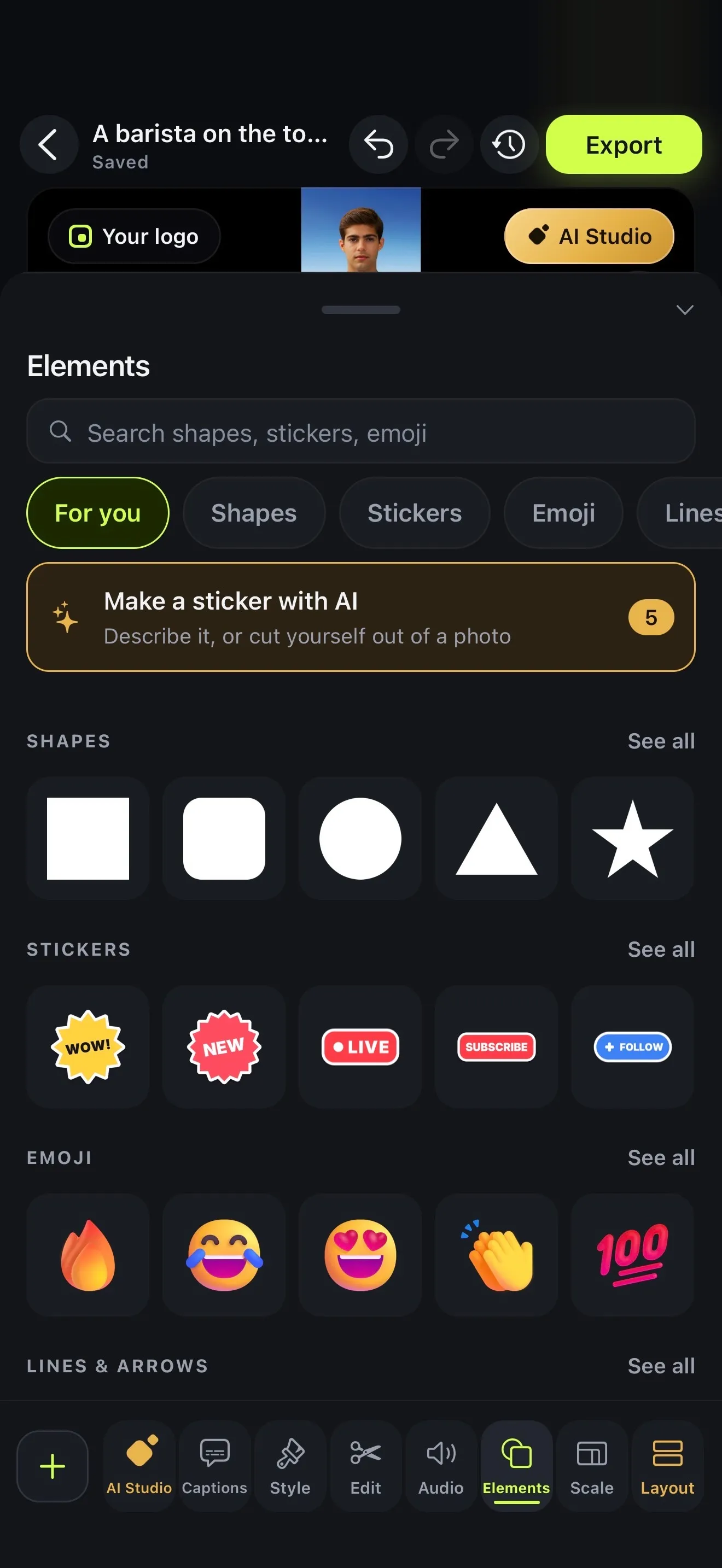
If you want something to sit on top of a video, open Elements in the editor and tap Make a sticker with AI. You can describe it (say, “a golden trophy with confetti”) and choose a look. Or use Cut out from a photo: pick a person, a pet or a product and the background is removed. Both give you a sticker on a see-through background, and every try stays in Your stickers.
Everything you make with AI goes into Your AI assets. Videos, images and audio are sorted newest first, and there's a search box. There's no stock library, so all of it is yours.
- Make a sticker with AI: 5 credits
- Cartoon, 3D, Flat, Hand-drawn, Pixel art
- Cut out from a photo: 2 credits
- Your AI assets: every picture, film and track
03 · Use them
Use images in videos and posts
A picture you make isn't stuck in one project. In any video, tap + → Your uploads and you'll find it next to everything else you've made or uploaded. Reusing it costs nothing. On the video it behaves like any photo, with its own size and an entrance such as Fade in or Pop in.
To post it on its own, open it in Your AI assets and tap Save. If you'd rather fill a talking video with pictures, sentence by sentence, the AI b-roll generator marks the moments and makes one for each. To make a picture move, use image to video.
- + → Your uploads in any project, for free
- Over the video, with a size and an entrance
- Save to Photos for a post anywhere
- Generated B-roll: a picture per sentence
How it works on iPhone
How to create an image with AI on iPhone
-
Open Create images with AI
On the Create tab, under Images, tap Create images with AI.
-
Say what it should show
Under What should the picture show?, describe the picture in a sentence or two.
-
Add photos to work from
Optional: under Photos to work from, add up to 4, such as a face, a room or a product. Then use your words to say what should change.
-
Pick the frame
Choose 9:16 for Stories and Reels, 1:1 for a post or 16:9 for widescreen.
-
Generate the image
Tap Generate image. The picture is saved to Your AI assets. For another go with the same words, tap Recreate this.
FAQ
Questions people ask
How does Voxcene's AI image generator work?
Open Create images with AI, describe the picture, pick a frame and tap Generate image. The picture shows up on the same screen, and it's also saved to Your AI assets so you can use it in any project.
Can I generate an image from my own photo?
Yes. Add up to four photos under Photos to work from (a face, a room, a product) and say what should change, for example “the same person with a short platinum bob, studio light”. You don't need photos, though. A description on its own works too.
How much does it cost?
Each picture costs 5 AI credits, and creating images is part of the Premium plan, which includes 600 AI credits a month. Recreate this is another picture, so it costs another 5.
What sizes can I make?
Three frames: 9:16 for Stories, Reels and TikTok, 1:1 for a square post, and 16:9 for widescreen. Square is the default.
Where do my images go, and can I save them to my phone?
Each picture goes into Your AI assets, where the newest comes first and you can search. Open one and tap Save to keep it in your Photos, or add it to any project from + → Your uploads.
Can it make stickers with a see-through background?
Yes, in the editor. Open Elements → Make a sticker with AI and describe it in a Cartoon, 3D, Flat, Hand-drawn or Pixel art look for 5 credits, or Cut out from a photo for 2. Every try is kept in Your stickers.
Is there a stock image library?
No. Voxcene doesn't include stock photos. Your library is what you make and upload yourself, and it's reusable in every project.