Remove filler words
Remove “um” and “uh” from your video
Remove filler words from video without guessing. Voxcene finds the “um”, “uh” and “εεε” moments and shows you each one before anything is cut. Then you choose whether they go from the captions or from the video itself.
for iPhone
- Every filler listed
- Safe · Review · Keep
- Captions or video
- English & Greek
01 · The list Premium
See the list of filler words before cutting
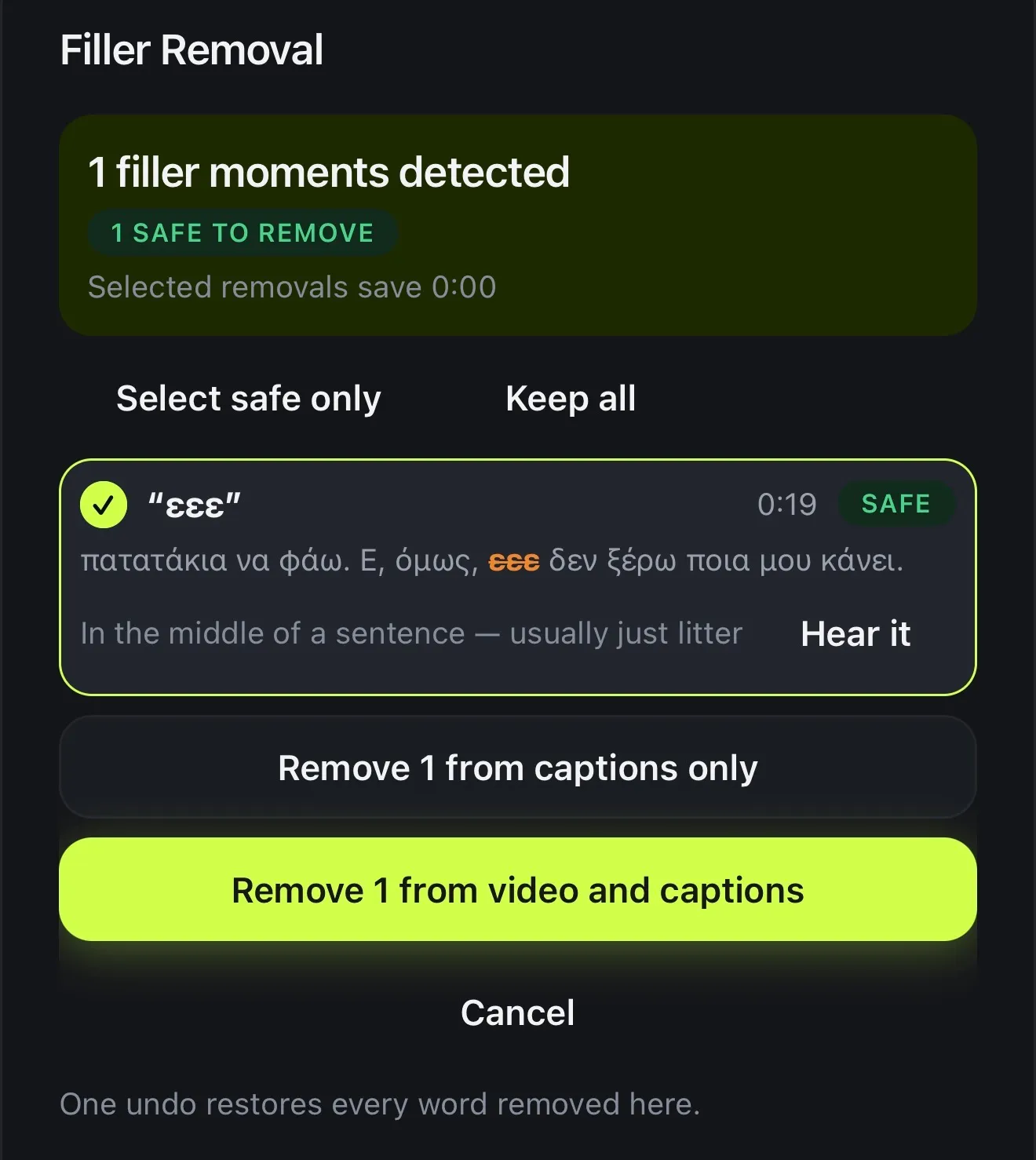
When cuts happen where you can't see them, a sentence can lose the one word it needed. That's why Filler Removal lists every moment it found first. A plain hesitation is Safe, a probable filler is Review, and a word that carries meaning is Keep.
Tap Hear it on any line to listen. Then use Select safe only, or tick and untick them one by one.
- Every filler, with where it is
- Safe, Review or Keep, and why
- Only Safe ones start ticked
- Hear it before you decide
02 · How far
Captions only, or captions and video
Remove from captions only cleans the subtitles and leaves the picture untouched, which is the better choice when a cut would make the video jump. Remove from video and captions cuts the moment out of the video too, and the rest of the edit closes up.
If you change your mind, one undo brings back all the words that pass removed. Each cut is also listed under Removed, so you can put it back.
- Remove from captions only: the picture stays
- Remove from video and captions: cut it out
- One undo restores the whole pass
- Cuts listed under Removed
03 · Languages
Built for English and Greek
Filler Removal recognises the hesitation sounds people make in English and Greek, including their longer spellings. Words that can carry meaning, like “well”, “so”, «λοιπόν» or «δηλαδή», are never ticked for you. “Like”, “I mean” and “you know” aren't treated as fillers at all.
Speaking another language? Your captions still work in 60+ languages, and AI Auto Trim removes the pauses in any of them.
- English: um, uh, er, erm, hmm, mm, mhm
- Greek: εε, εεε, εμ, μμ, χμ, αα
- Meaningful words never pre-ticked
- “Like” and “you know” left alone
English
- um
- uh
- er
- erm
- hmm
- mm
- mhm
- uh-huh
Ελληνικά
- εε
- εεε
- εμ
- εμμ
- μμ
- χμ
- αα
Never ticked for you
- well
- so
- anyway
- actually
- λοιπόν
- δηλαδή
- βασικά
How it works on iPhone
How to remove filler words from a video on iPhone
-
Caption the video
Open your project. Filler Removal works from the captions, so transcribe the video first.
-
Open Filler Removal
Tap AI Studio, then Filler Removal.
-
Read the list
Every “um” and “uh” is listed as Safe, Review or Keep. Only the safe ones start ticked.
-
Listen if unsure
Tap Hear it on any line. Select safe only and Keep all change the selection in one tap.
-
Remove them
Tap Remove from captions only, or Remove from video and captions to cut them out of the picture too.
FAQ
Questions people ask
How do I remove “um” and “uh” from a video?
In Voxcene, open AI Studio → Filler Removal. It lists every filler with a verdict, and only the safe ones start ticked. Tap Remove from video and captions to cut them out, or Remove from captions only to clean just the subtitles.
Will it cut words like “so” or “well”?
Not on its own. Words that can carry meaning (well, so, anyway, actually, and in Greek «λοιπόν», «δηλαδή», «βασικά», «ουσιαστικά») are never ticked for you. “You know”, “I mean” and “like” aren't treated as fillers at all.
Which languages does it work in?
Filler detection is built for English and Greek. Captions themselves work in 60+ languages.
Can I undo it?
Yes. One undo restores every word that pass removed, and the pieces you cut stay in a list where you can put any of them back.
Which plan do I need?
Filler Removal is part of AI Studio in Premium. It uses no AI credits.
Can it remove silences too?
Yes, with AI Auto Trim, which sits right next to Filler Removal in AI Studio. It handles pauses and dead air the same way, listing everything before anything is cut.