AI music generator
Make a song with lyrics and vocals
Describe the song in a sentence and Voxcene writes the lyrics and sings them. If you need music under a video instead, it can score the whole thing, start to finish.
for iPhone
- Sung in 60+ languages
- 30, 60 or 90 seconds
- Vocals & instrumental
- Score any video
01 · Brand Music Premium
Describe the song, hear it sung
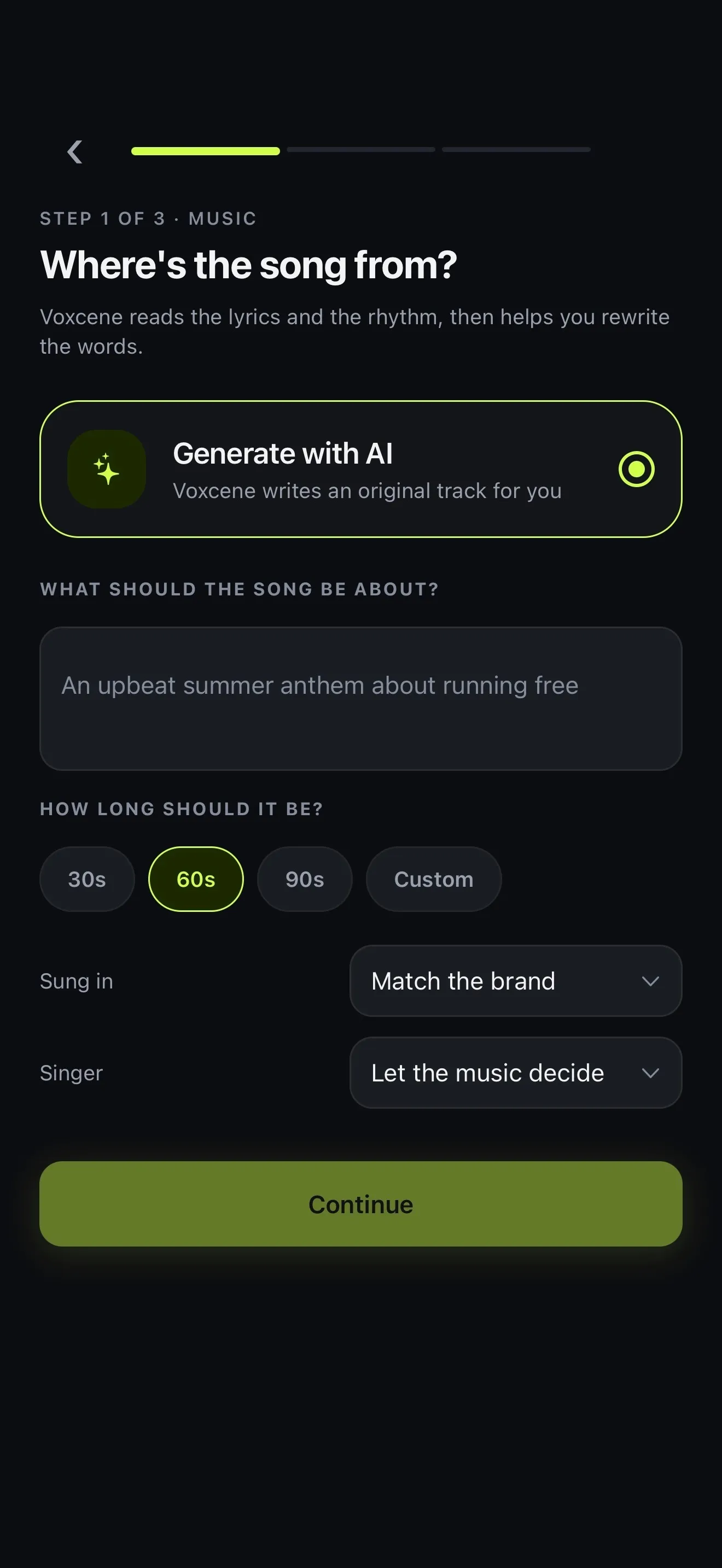
Most AI music generators give you a song about nothing in particular. Brand Music starts from what the song is for. Write what it should be about, choose how long it runs, then add a few details about your brand, like its name and what you sell. Voxcene writes the lyrics from that, and they come back sung.
Sung in starts on Match the brand, so a brief written in Greek gets a Greek song. You can pick any of 60+ languages instead. Singer sets who sings it: with A duet a man and a woman trade lines, and A group puts a choir on the chorus. Rap gives you rapped verses around a sung chorus.
- Lyrics written from your brief
- Singer: a woman, a man, a duet, a group or rap
- Sung in 60+ languages
- 30 s = 20 credits · 60 s = 40 · 90 s = 60
02 · Under your video
Music beds for your videos
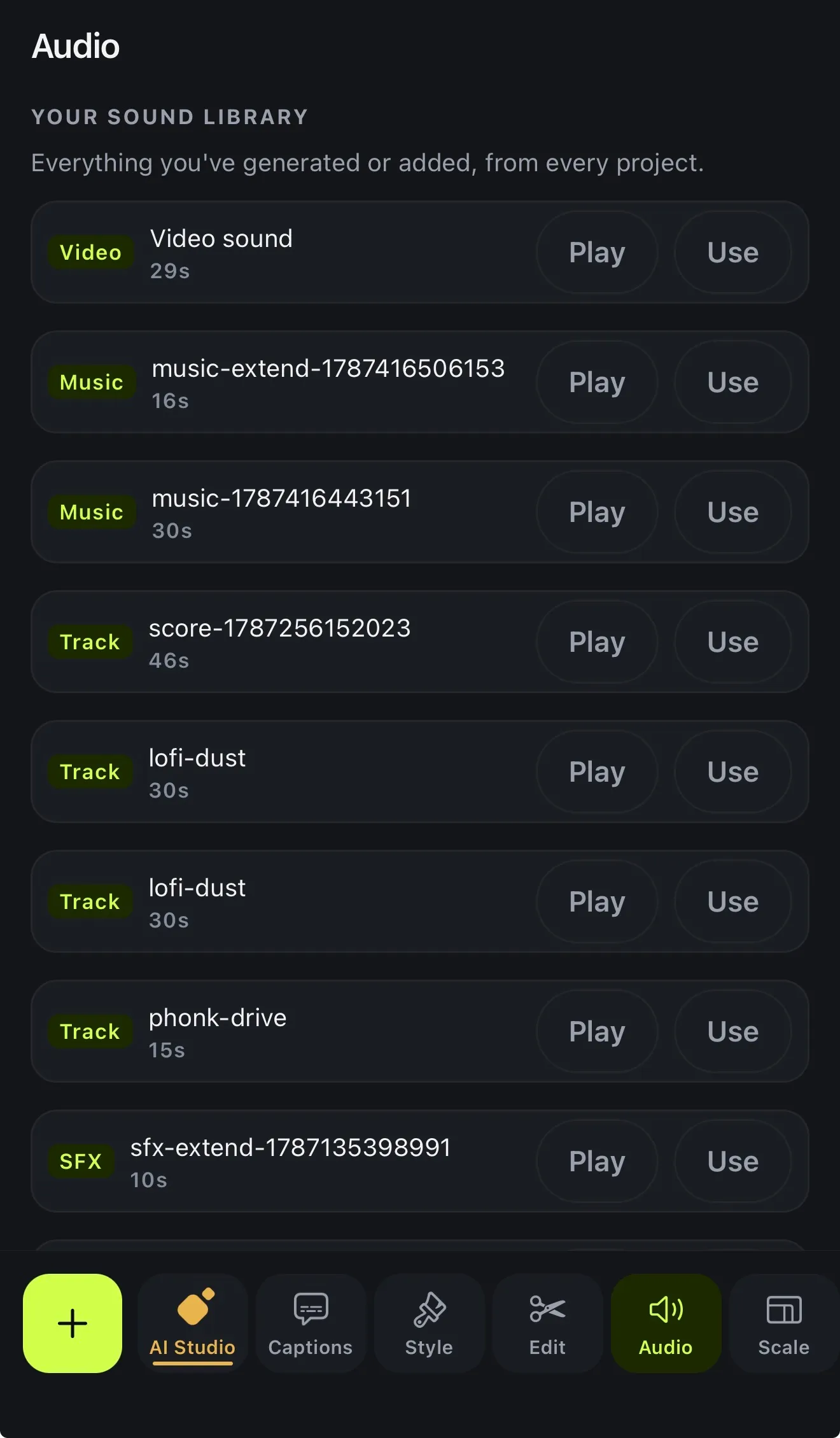
If you need music under a video rather than a song on its own, open Audio in the editor. Score this video works from what's said (or from the picture, when nobody speaks) and makes an instrumental bed the length of the video, up to five minutes. It costs 5 credits per minute.
You can also type what you want, like “lofi chill beat” or “epic trailer rise”. Pick a length or Fit to video and tap Generate music for 5 credits, and the track drops at the playhead. If the music runs out before the end, Extend carries an AI track on with new music.
- Score this video: sized to the whole video
- Works from your words, or the picture when nobody speaks
- Generate music: up to 60 s from a description
- Sound effects up to 30 s
03 · Use it
Use it in your videos
A brand track can go into a video right away. Open in a Project builds a project with the song on its own audio lane, and you add your footage, captions and logo from there. Anything you generate in the editor is kept in Your sound library, across all your projects.
After that you treat it like any other song. You can split it, Loop it, set its level and fade it out. To cut on the beat, tap Read and then Cut my clips there. There's more in adding music to video, and if you want a short sung line for your business, try the jingle maker.
- Open in a Project: the song on its own lane
- Every generated track kept in Your sound library
- Loop or Extend a track to the end
- Read the music, then cut your clips on the beat
How it works on iPhone
How to make a song with AI on iPhone
-
Open Brand Music
On the Create tab, under MUSIC, tap Brand Music, then Generate with AI.
-
Describe the song
Under What should the song be about?, write one or two plain sentences. Pick 30s, 60s, 90s or Custom.
-
Choose the voice
Leave Sung in on Match the brand or pick a language, then choose a Singer. Tap Continue.
-
Add the brief
Fill in Tell us about your brand (only Brand name is required), then tap Write my song.
-
Use it
About a minute later the song is in My Music. Download it, or tap Open in a Project to put it under a video.
FAQ
Questions people ask
Can Voxcene make a song with lyrics and vocals?
Yes. Brand Music writes lyrics from your brief, and they're sung by a woman, a man, a duet or a group, or performed as rap. The language follows your brief, or you can pick any of 60+. It's part of Premium.
Can I write my own lyrics?
Not line by line. You describe the song and the brand, and Voxcene writes the words. If something has to be in the song, like your name or your slogan, add it under Required words (up to 12).
Can I change the lyrics after the song is made?
Not in this version. If the words aren't right, change the brief and tap Create another.
What does it cost?
Brand Music costs 20 AI credits for a 30-second song, 40 for 60 seconds and 60 for 90; a custom length from 15 seconds to 3 minutes is priced by its length. In the editor, Generate music costs 5 credits a track and Score this video 5 credits per minute of video.
Which plan do I need?
Brand Music is Premium only. Generate music and Score this video run on AI credits: Premium includes 600 a month, and a new Free account's 20 starter credits are enough to try them. Basic has no AI credits.
Can I download the vocals and the instrumental separately?
Yes. A finished brand track downloads as the full track, the vocals alone, the instrumental alone, or the lyrics as a transcript, through the iPhone share sheet.
Can I use the music on Instagram and TikTok?
Voxcene claims no ownership of what it makes for you; see our Terms. Some platforms and countries ask you to label AI-made content, so check what applies before a paid campaign.