AI video editor
The AI video editor that does the editing
Voxcene works through your video word by word and pause by pause, then proposes an edit. It can cut the dead air and the ums or find the Reels in it, and it can plan a full cut for the goal you pick. You decide what gets applied.
for iPhone
- Reads the transcript
- Proposes, never forces
- One undo away
- Premium · 600 credits
01 · AI Edit Premium
AI Edit: a full edit, proposed from your transcript
Tap Make It Tighter and pick what the video is for. A Hook is fast, a Tutorial is clear, and a Story keeps its rhythm. AI Edit works from the timed transcript and marks the pauses, wandering sentences and false starts to cut, with a reason for each. It also picks a caption style, a colour look and title cards.
It never cuts mid-word and never removes more than half of your material. It costs 4 AI credits a minute of video.
- Goals: Hook, Tutorial or Story
- Cuts with a reason, never mid-word
- Caption style, a colour look, title cards
- Marks the spots that want a picture
02 · Measures first
It measures your video before it suggests anything
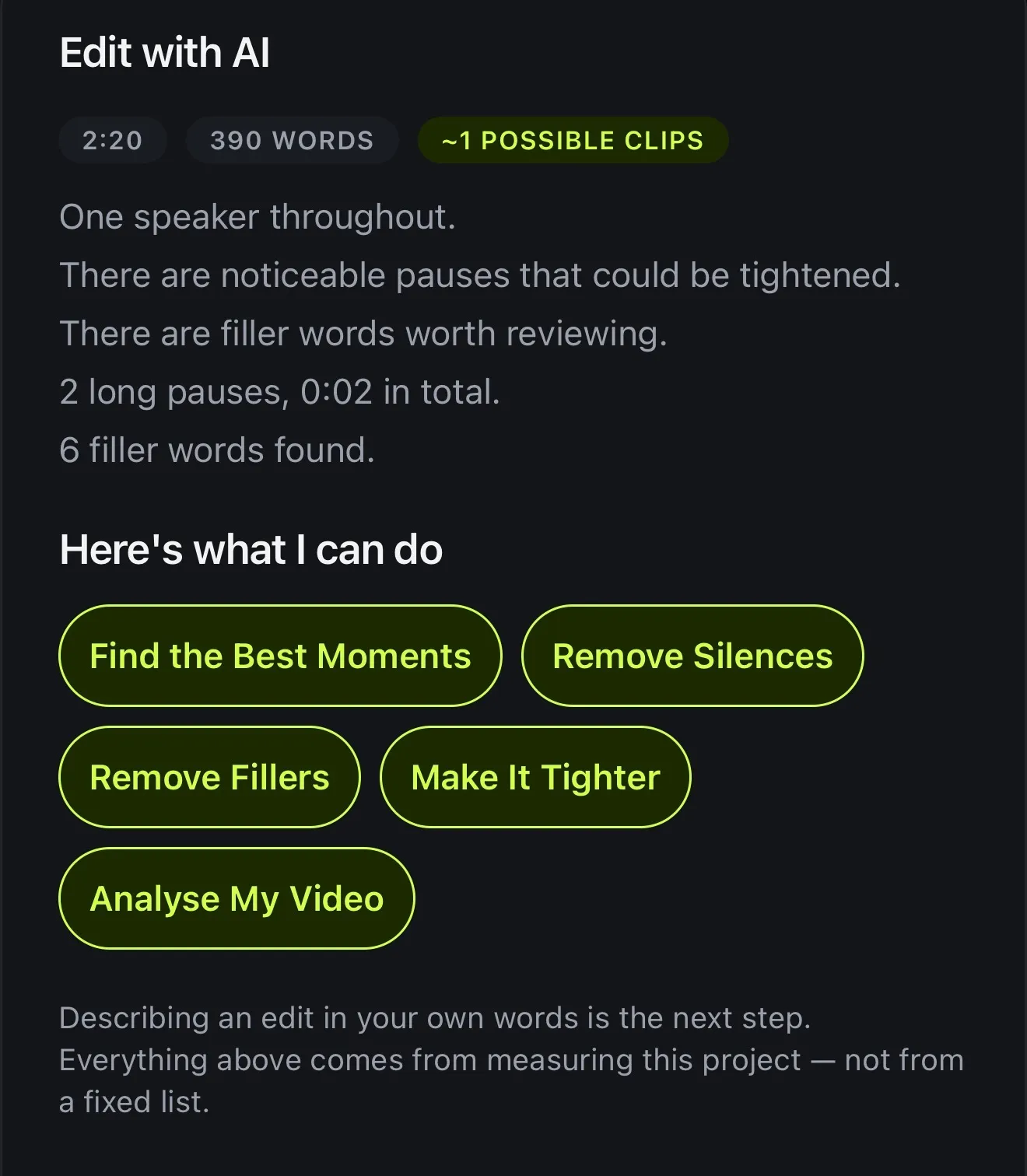
When you open the AI Video Editor, it measures the video before suggesting anything. You see how long it is, how many words there are and how many clips it might hold. It also counts the speakers and finds the long pauses and fillers.
The suggestions come from measuring this project, not from a fixed list. Depending on the video you'll see Remove Silences, Remove Fillers, Make It Tighter, Find the Best Moments or Create Reels.
- Length, words, possible clips
- Speakers, long pauses, fillers
- Suggestions built from your project
- Measuring is free
03 · Chat
Chat to Edit: say it in your own words
If you'd rather type it out, Chat to Edit takes a request in your own words, like “remove the long pauses” or “make some Reels out of this”. It proposes the changes, and nothing happens until you apply them. How Chat to Edit works.
- Type what you want changed
- Each change on its own card
- Clean audio, silences, fillers, vertical, Reels
- 1 AI credit a message
04 · Your call
Nothing changes until you apply it
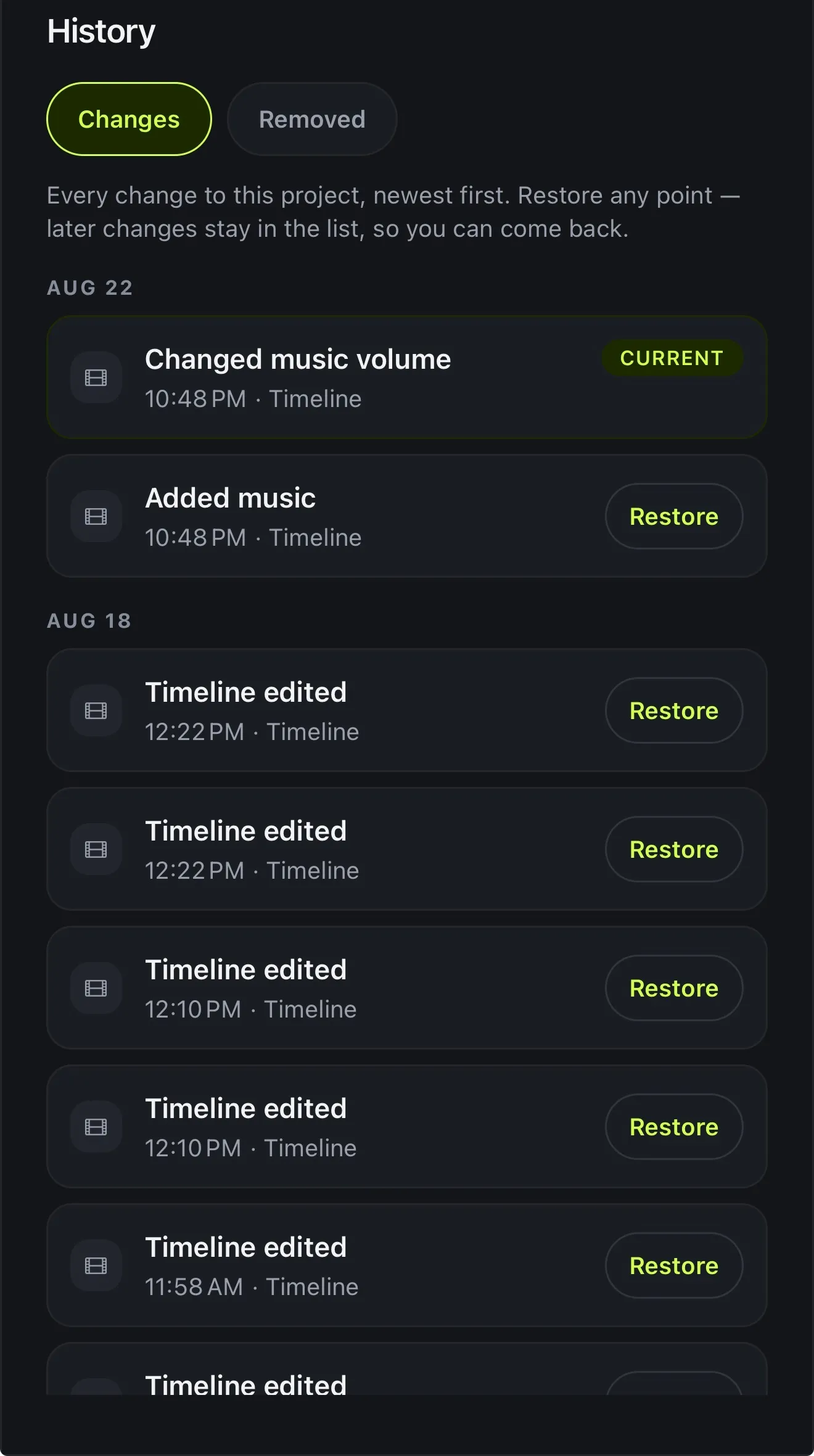
Every AI tool in Voxcene works the same way. It shows what it found and what it would do, and nothing happens until you say so. After you apply a change, one undo takes it back. The pieces it cut are listed under Removed, and History can take the whole project back to any earlier point.
- Every tool proposes first
- One undo takes a change back
- Removed lists every cut, so you can put any back
- History restores any earlier version
05 · Costs
Every AI tool, and what it costs
AI Studio is part of Premium, and its tools run on AI credits. You get 600 a month, and there are top-up packs if you need more. The table shows what each tool costs, as listed on the app's What AI costs sheet today.
- Premium includes 600 AI credits a month
- Some tools use no credits at all
- The price is shown in the app
What AI costs · credits
| AI edit | 4 a minute |
| Long Video to Reels | 4 a minute |
| Dub into another language | 100 a minute |
| Translate captions | 3 a minute |
| Chat to Edit | 1 a message |
| Analyse this video | 1 |
| AI Auto Trim | 1 a video |
| AI Denoise | 1 a video |
| Suggest b-roll | 2 |
| Filler Removal | Free |
| Find the best moments | Free |
| Automatic brand template | Free |
| Layout | Free |
How it works on iPhone
How to edit a video with AI on iPhone
-
Open your video
Open the video you want edited. Voxcene captions it first, so the edit is based on what's said and when.
-
Tap AI Studio
Open AI Studio and tap AI Video Editor. It measures the video and shows you what it found.
-
Pick what to do
Choose from what it suggests, such as Make It Tighter, Remove Silences, Remove Fillers, Find the Best Moments or Create Reels.
-
Read the proposal
For AI Edit, pick Hook, Tutorial or Story. It proposes the cuts, a caption style, a look and title cards.
-
Apply what you like
Nothing changes until you apply it, and you can undo any change.
FAQ
Questions people ask
What is an AI video editor?
It's an editor that looks at your footage (what's said, where the pauses are, how long it runs) and proposes the edit for you. In Voxcene the AI suggests and you decide, so nothing changes until you apply it.
Can AI edit my video for me?
It can propose a full edit. You pick a goal (Hook, Tutorial or Story) and AI Edit works from your transcript to suggest cuts, with a reason for each, plus a caption style, a colour look and title cards. Whether you apply it is up to you.
Which AI tools are included?
AI Studio includes the AI Video Editor and AI Edit, Chat to Edit, Long Video to Reels, AI Auto Trim, Filler Removal, AI Denoise, dubbing into another language, Analyse this video, Generated B-roll, an automatic brand template, Layout and Motion.
Is the AI video editor free?
AI Studio is part of Premium, which includes 600 AI credits a month. Several tools use no credits at all: Filler Removal, Find the best moments, the automatic brand template and Layout.
Will it change my video without asking?
No. Every AI tool in Voxcene shows what it would do first. After you apply a change you can still undo it, or restore any earlier version from History.
Does it work in other languages?
Yes. It works from your captions, in any of the 60+ languages Voxcene transcribes. Filler Removal knows the English and Greek fillers, like “um”, “uh” and “εεε”.