AI logo intro maker
Animate your logo into a 5-second intro
Add your logo and Voxcene sets it on a stage, then films it with a real camera move such as an orbit, a flare or a burst of fire. You get a five-second sting to open or close any video.
for iPhone
- 5-second sting
- 56 movements
- 9:16 · 1:1 · 16:9
- 80 credits · Premium
-
 Set on Fire
-
 Diamond
-
 Glowshift
-
 360 Orbit
01 · Your logo Premium
Upload a logo, get an animated sting
Logo intro turns your logo into a short, cinematic opener. When you add the file, Voxcene places the mark large on a stage (matching your logo's own background colour if it has one) and films it with the movement you choose.
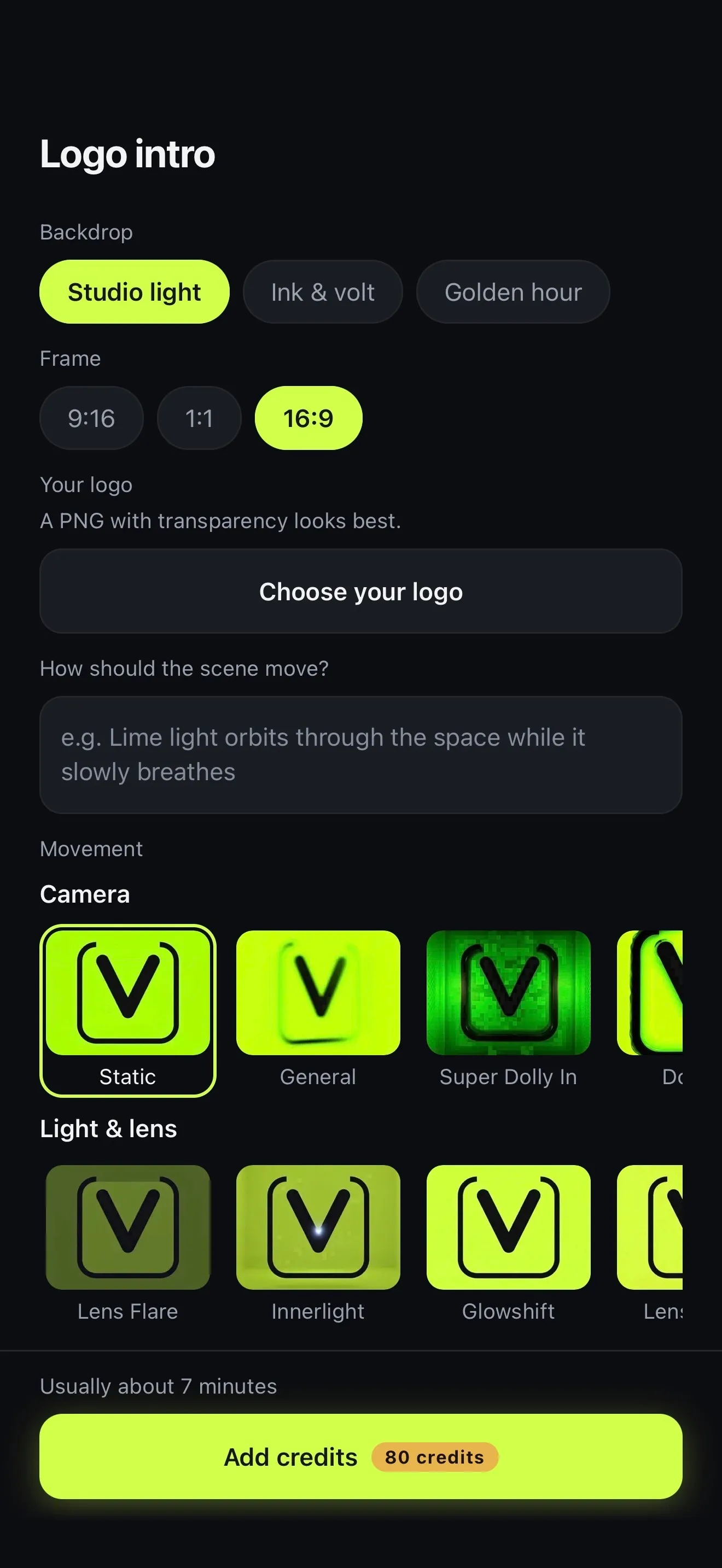
You don't need desktop software, a template or keyframes. Everything is on one screen: a backdrop, a frame, your logo and a movement, with the price on the button before you tap Create intro. You can leave while it renders and find the intro in your projects.
- One logo in, a 5-second sting out
- The mark fills the frame
- Usually ready in about 7 minutes
- 80 credits; 85 with music
02 · Look & sound
Styles and sound
Backdrop sets the light. You can have a bright paper-white studio with drifting dust, a charcoal room traced with lime light, or a warm golden-hour haze. Movement sets the shot: 32 Camera moves, 10 Light & lens treatments and 14 that Transform the mark. Each tile plays its move, so you choose by watching.
If you have a particular mood in mind, write it under How should the scene move?, for example “lime light orbits through the space while it slowly breathes”. Each intro gets its own reveal sound, a rising whoosh into a soft impact. Add music lays a short bed underneath.
- Backdrops: Studio light, Ink & volt, Golden hour
- 56 movements in three rows
- Your own words for the mood
- A reveal sound, plus music if you want it
Camera 32
-
 Static
-
 3D Rotation
-
 Dolly In
Light & lens 10
-
 Lens Flare
-
 Innerlight
-
 Low Shutter
Transform the mark 14
-
 Melting
-
 Levitation
-
 Thunder God
03 · Intro or outro
Use it as intro or outro
The intro opens in the editor like any project, so you can add a title, a caption or your own music before you export. To open a video with it, tap + → Clip in the intro's project and pick your video. It goes in right after the sting.
To close with it, export the intro once and add it to the end of each video with + → Clip. If you make one in each frame (wide for YouTube, tall for Reels, TikTok and Shorts), your brand opens every format the same way.
- Opens as its own project
- + → Clip: your video lands after the sting
- Export it, then add it to the end of any video
- 16:9 for YouTube, 9:16 for Reels and Shorts
04 · Your brand
How close it stays to your logo
It's worth being clear about this. Every movement films your logo as a real, lit object, so it will change a little: strokes thicken and light catches the edges. Static stays closest, which is why it's the default.
The further down the list you go, the more freedom the model has. Lens treatments can shift colours, and the Transform the mark row remakes the logo in metal, dust or fire. If your brand rules say the mark may never be redrawn, stick with Static. Either way, try a few before you keep one.
- Static is the default and the closest hold
- Camera moves change the mark least
- Light & lens can shift its colours
- Transform the mark remakes it on purpose
- Static Closest to the original
- Lens Flare Colours shift
- Melting The mark is remade
How it works on iPhone
How to make a logo intro on iPhone
-
Open Logo intro
On the Create tab, under AI videos, tap Logo intro.
-
Set the look and shape
Pick a Backdrop (Studio light, Ink & volt or Golden hour) and a Frame: 9:16, 1:1 or 16:9.
-
Add your logo
Tap Choose your logo. A PNG with transparency looks best.
-
Pick a movement
Under Movement, watch the tiles in Camera, Light & lens and Transform the mark, and tap one. Add a line under How should the scene move? if you like.
-
Create the intro
Tick Add music if you want a bed under it, then tap Create intro. It usually takes about 7 minutes; then Open in editor.
FAQ
Questions people ask
How do I make a logo animation on my iPhone?
Open Logo intro in Voxcene, choose a backdrop and a frame, add your logo and pick a movement. Tap Create intro and you get a five-second animated sting, opened as a project you can edit and export.
Will my logo stay exactly the same?
Not exactly. Every movement films your logo as a real, lit object, so expect some change. Static, the default, stays closest to your original. The Transform the mark movements remake it entirely in metal, dust or fire. Try a few and keep the one that suits your brand.
What logo file works best?
A PNG with a transparent background. If your file has a solid background, Voxcene matches the stage to that colour, so no square shows around the mark.
Does the intro have sound?
Yes. Voxcene makes a reveal sound for it, a rising whoosh into a soft impact. For 5 more credits, tick Add music and a short instrumental bed goes under it too. If the sound can't be made, the intro still arrives, just silent.
Can I make a YouTube intro with it?
Yes. The frame is 16:9 by default, which is the shape YouTube uses. Pick 9:16 for Shorts, Reels and TikTok, or 1:1 for a square post. The intro opens in the editor, so you can add a title over it.
How much does it cost?
A logo intro costs 80 AI credits, or 85 with music, and is part of the Premium plan, which includes 600 AI credits a month. If a run fails, nothing is charged for the part that failed.
Can I use it as an outro too?
Yes. Export the intro, then in any video tap + → Clip and it lands at the end. To use it as an opener, start from the intro's own project and add your video after it the same way.