For content creators

Create more content in less time

Voxcene is a video editor on your iPhone that handles the slow parts. It captions what you say and finds the dead air and the ums. It can also turn one long recording into several short ones, so more of your time goes on filming.

Download on the App Store Free to download
for iPhone
  • Captions in 60+ languages
  • 143 caption styles
  • AI first cut on Premium
  • Free to start
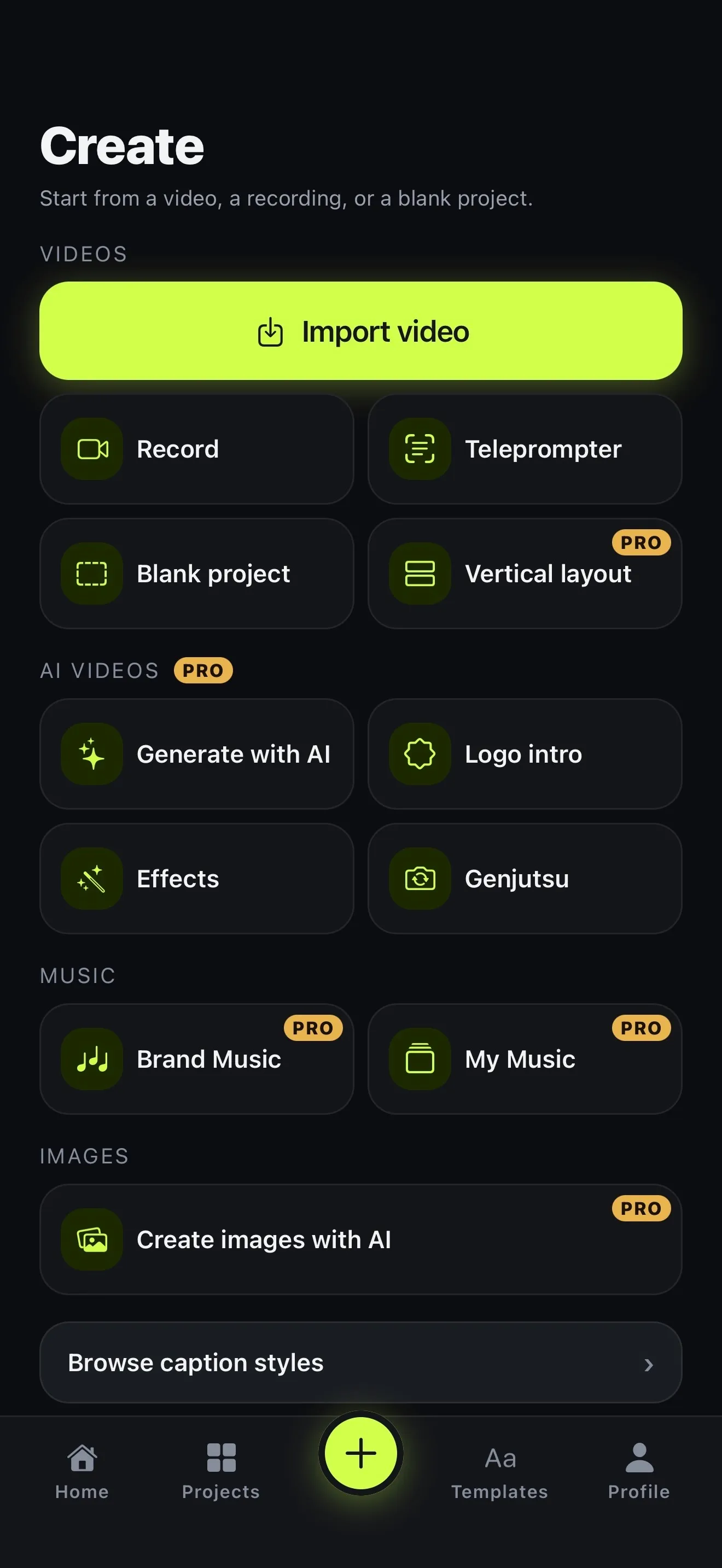
The Create tab: Import video, then Record, Teleprompter, Blank project and Vertical layout; AI videos — Generate with AI, Logo intro, Effects and Genjutsu; Brand Music and My Music; Create images with AI

01 · One app

Record, edit, caption and share from one app

Most creators film, cut, caption and post across four different apps. Voxcene does all of it in one. Film on the Create tab with Record, or read a script with the free teleprompter. The take becomes a project and is captioned automatically, with each word timed.

Then edit on a proper timeline, where you can split, trim, change speed and add transitions, colour and music. Export with a preset for the feed you're posting to. Once the video is in your Photos, Next steps writes a title, a description and five hashtags from what you said (1 AI credit). It then opens Instagram, TikTok or LinkedIn with the text copied, ready to paste.

  • Record or Teleprompter: free, up to 4K
  • Captions in 60+ languages, timed word by word
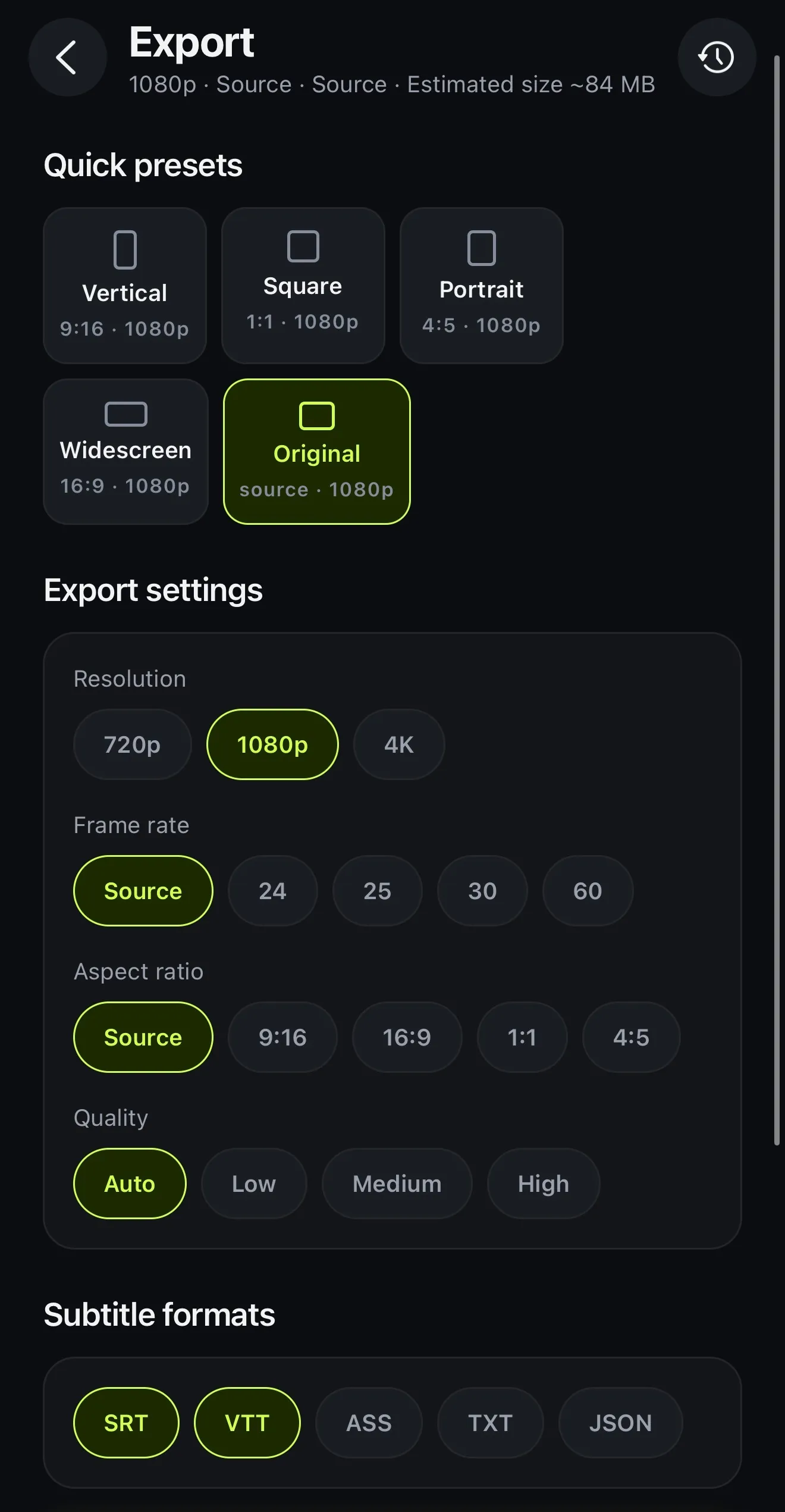
  • Quick presets: Vertical, Square, Portrait, Widescreen
  • Next steps writes the post text for you
The Export screen: quick presets Vertical, Square, Portrait, Widescreen and Original, then resolution, frame rate, aspect ratio and quality, and the subtitle formats SRT, VTT, ASS, TXT and JSON
One export screen for every feed

02 · First cut Premium

AI does the first cut

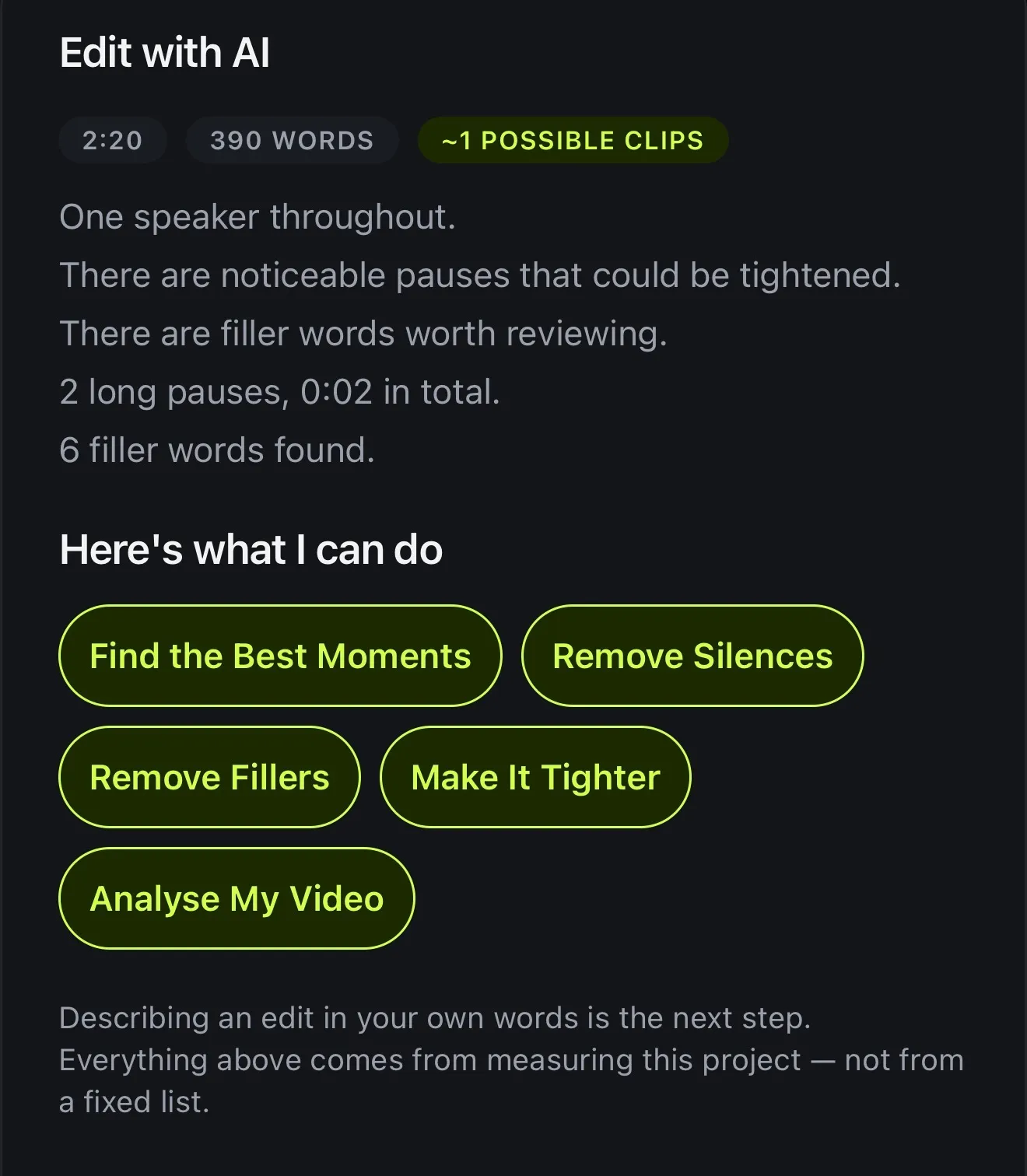
The first cut is the dull part, where you hunt down long pauses and false starts. Open AI Studio → AI Video Editor and Voxcene measures the video's length, pauses and filler words, then suggests what's worth doing.

Remove Silences shows you each gap before it's cut. Remove Fillers finds the ums in English and Greek. Make It Tighter proposes a whole edit for the goal you pick, with a reason for each cut, plus a caption style, a colour look and title cards. You read it and decide whether to apply it, and any change can be undone. More on the AI video editor.

  • Measures your video for free
  • Remove Silences and Remove Fillers
  • Make It Tighter: Hook, Tutorial or Story
  • Nothing changes until you apply it
Edit with AI: 2:20, 390 words, about one possible clip; one speaker, noticeable pauses, filler words worth reviewing; then Find the Best Moments, Remove Silences, Remove Fillers, Make It Tighter and Analyse My Video
Edit with AI measures first, then suggests

03 · Templates

Templates, titles and a hook edit

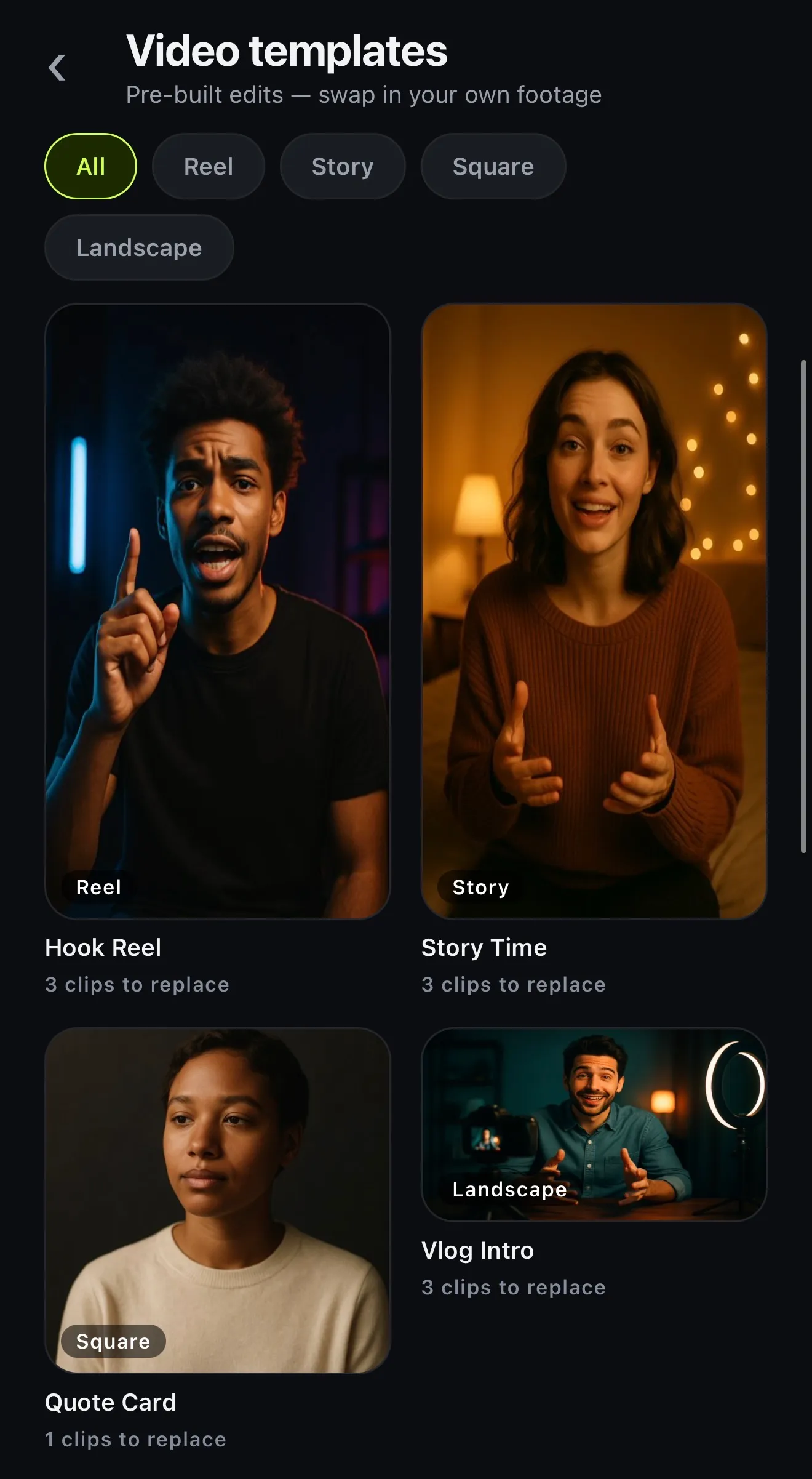
Starting from a blank timeline takes a while. Video templates are pre-built edits with the cuts, music, captions and text already in place, and Use my clips drops your footage in. Hook Reel is built around the first two seconds, and Vlog Intro is 16:9 for YouTube. Story Time and Quote Card cover the rest.

For your own edit, add a Title at the start or text anywhere, drop in an animated Motion look, and on Premium let AI Edit cut for a Hook — tight and fast. There's no library of ready-made hook clips in this version: the hook is your own opening line, cut tight.

  • 10 video templates: 4 on Free, all 10 on paid plans
  • Hook Reel: grab them in the first two seconds
  • Title and text layers on every plan
  • Motion: 30 looks on Basic, 400 on Premium
Video templates: pre-built edits — swap in your own footage; All, Reel, Story, Square and Landscape; Hook Reel, Story Time, Quote Card and Vlog Intro, each with the number of clips to replace
Video templates: swap in your own footage

04 · Every feed

One recording, a week of posts

If you want to post more, film less and cut more. On Premium, Long Video to Reels goes through a long recording and finds the moments that work on their own, and each one becomes its own vertical project. For a two-person conversation there's Podcast, which cuts to whoever is talking and gives you clips as well.

Change the shape under Scale without re-editing, and, with AI credits, translate the captions to reach people in another language. That way one recording can fill a week of posts.

  • Long Video to Reels: each clip its own project
  • 9:16, 1:1, 4:5 or 16:9 under Scale
  • Translate captions into 60+ languages
  • Podcast: the episode plus vertical clips

Plans

Voxcene Gold Tickets

Three plans on one ticket. The gold column opens AI Studio, Make with AI and Podcast.

Billing period
VX · ADMIT ONE
What each plan includes, and what it costs
Free Basic Premium AI STUDIO
Price €0 forever €8.99 a month €89.99 a year save 17% €17.99 a month €179.99 a year save 17% 7-day free trial
Video length 60 sec 15 min 90 min
Transcription a month 3 min 120 min 600 min
Caption styles 4 of 143 All 143 All 143
Export 720p · watermark 1080p 4K
Filler removal Not included Not included Captions + video
AI credits 20 once Not included 600 a month
AI Studio Not included Not included All 12 tools
Make with AI NEW Not included Not included Included
Podcast NEW Not included Not included Included

Premium can top up: 200 credits for €5.99, 600 credits for €9.99 or 2000 credits for €29.99.

Prices in euros. The App Store charges in your own currency, so your price may differ a little. Cancel from your Apple Account whenever you like, and keep what you paid for until the period ends.

Download on the App Store

Start free. No card needed for the free plan.

Your plan works in the app and on studio.voxcene.com.

How it works on iPhone

How to make a video for social media on iPhone

  1. Record or import

    On the Create tab, tap Record or Teleprompter to film, or Import video to bring in something you've shot.

  2. Caption it

    Choose the spoken language, or Detect automatically, and tap Create & transcribe. The captions are timed word by word.

  3. Let AI do the first cut

    On Premium, open AI Studio → AI Video Editor and pick Remove Silences, Remove Fillers or Make It Tighter.

  4. Make it yours

    Pick a caption style, add a Title or a Motion look, and set the frame under Scale.

  5. Export and share

    Tap Export and a quick preset such as Vertical. The video is saved to Photos, and Next steps opens with the post text.

FAQ

Questions people ask

What is the best video editor for content creators on iPhone?

Ideally one that handles the slow parts for you. Voxcene captions your videos in 60+ languages and finds the silences and the ums. It can also turn long videos into Reels and export for TikTok, Reels, Shorts and YouTube, all on your iPhone without a computer.

Can I record inside the app?

Yes. The Create tab has Record and a free Teleprompter that scrolls your script over the camera. Takes can be up to 5 minutes, recorded in 4K, 1080p or 720p, and each one goes into a project.

Does Voxcene post to TikTok or Instagram for me?

No, but it gets you ready to post. After export the video is in your Photos, and Next steps writes a title, a description and five hashtags from what you said. Its Instagram, TikTok and LinkedIn buttons copy that text and open the app, so you paste and post. Writing the text uses 1 AI credit.

Can AI make a video for me from an idea?

Yes, on Premium. Generate with AI turns an idea into a narrated, captioned video of about 20, 35 or 60 seconds, in 9:16, 1:1 or 16:9. You get a script, one narration voice, a picture per shot (or your own photos) and music. It opens as a normal project you can edit.

Is there a watermark?

Only on the Free plan, which exports at 720p with a watermark. Basic exports at up to 1080p and Premium at up to 4K, both without a watermark.

Does Voxcene have stock music or stock footage?

No. You bring the footage and the music yourself, from your phone, from Files or from your sound library of things you've added before. On Premium you can also generate music with AI credits.

Which plan do I need?

Start free: 3 projects a month, videos up to 60 seconds and 4 caption styles. Basic adds videos up to 15 minutes, all 143 caption styles and 1080p without a watermark. Premium adds AI Studio, 600 AI credits a month, Podcast, Generate with AI, videos up to 90 minutes and 4K.

Try it on the next video you film.

Download on the App Store Free to download · upgrade only if you need more